
1. What Is a CRM System?
A Customer Relationship Management (CRM) system is software that helps businesses organize customer information, track sales opportunities, manage communication and maintain relationships throughout the customer lifecycle.
Instead of keeping customer details in spreadsheets, email accounts and separate applications, a CRM brings important information into one centralized system.
For example, when a potential customer submits an enquiry through a website:
- The enquiry is captured in the CRM.
- The system assigns the lead to an appropriate sales representative.
- The representative contacts the prospect and records the interaction.
- Follow-up activities and reminders are scheduled.
- The opportunity moves through the sales pipeline.
- Once the deal is closed, the CRM maintains the customer record for future communication and support.
A properly configured CRM makes this process easier to manage and gives business owners better visibility into sales activities.
2. What Is HubSpot CRM?
HubSpot CRM is a customer relationship management platform designed to connect sales, marketing, customer service, content and business operations.
Its ecosystem includes different products, commonly known as Hubs:
- Smart CRM: Centralized customer and business data.
- Sales Hub: Lead management, sales pipelines, prospecting and sales automation.
- Marketing Hub: Email marketing, campaign management, forms and marketing automation.
- Service Hub: Customer support, ticket management and service workflows.
- Content Hub: Website content management and digital experiences.
- Data Hub: Data management, synchronization and data quality capabilities.
These products can work together, allowing businesses to manage customer interactions across multiple departments.
Key Features of HubSpot CRM
1. Contact and Lead Management
HubSpot maintains customer profiles containing contact details, company information, communication history, activities and associated deals.
2. Sales Pipeline Management
Businesses can create sales pipelines, define deal stages, assign sales representatives and monitor opportunities from initial enquiry to closure.
3. Marketing Automation
HubSpot supports marketing activities such as email campaigns, lead nurturing, forms, audience segmentation and campaign tracking. Available capabilities depend on the selected subscription.
4. Workflow Automation
Businesses can automate repetitive activities such as assigning leads, updating records, sending notifications and managing follow-up processes.
5. Reporting and Analytics
Sales managers can monitor pipeline performance, conversion rates, sales activities and other business metrics through dashboards and reports.
6. AI Capabilities
HubSpot offers AI-powered capabilities through its Breeze ecosystem and other product features. Depending on the subscription, these can support content creation, prospecting, customer assistance, data enrichment and sales workflows.
7. Integration Capabilities
HubSpot connects with many third-party applications and also provides APIs, webhooks and developer tools for custom integrations.
Benefits of HubSpot CRM
- Centralized customer information across business departments.
- Easy-to-understand sales pipeline management.
- Connected sales, marketing and customer service tools.
- Automation of repetitive sales and marketing tasks.
- Reporting and visibility into customer activities.
- Integration with websites and external applications.
- AI-assisted business workflows.
HubSpot is particularly useful for businesses that want sales and marketing teams to work within a connected platform.
3. What Is Zoho CRM?
Zoho CRM is a customer relationship management platform that helps businesses manage leads, contacts, accounts, deals, sales activities and customer communication.
It is part of the broader Zoho ecosystem, which includes applications for accounting, email, customer support, marketing, project management and business operations.
Zoho CRM provides extensive customization options, workflow automation and integration capabilities. Businesses can configure the platform around their sales processes and connect it with other Zoho applications or external systems.
Key Features of Zoho CRM
1. Lead and Contact Management
Zoho CRM allows businesses to capture leads, manage customer records, track communication and maintain account information.
2. Sales Pipeline Management
Sales teams can create multiple pipelines, configure deal stages, monitor sales opportunities and track the progress of each deal.
3. Workflow Automation
Zoho supports workflow rules, scheduled actions, assignment rules, approval processes and other automation features. Available limits depend on the selected edition.
4. Custom Modules and Fields
Businesses can create custom fields, modules and data structures to manage information that does not fit standard CRM records.
5. Sales Forecasting and Analytics
Zoho provides reporting, forecasting and dashboards to help managers understand sales performance and identify business trends.
6. AI Capabilities Through Zia
Zoho’s Zia AI capabilities can support sales predictions, recommendations, data insights and other intelligent CRM activities. The available features depend on the edition and configuration.
7. Integration With Zoho Applications
Zoho CRM can connect with applications such as Zoho Books, Zoho Campaigns, Zoho Desk and other services within the Zoho ecosystem.
8. Custom Development
Zoho provides APIs, custom functions, developer tools and integration options that allow businesses to extend CRM functionality.
Benefits of Zoho CRM
- Flexible customization of CRM modules and fields.
- Sales process automation.
- Integration with other Zoho applications.
- Multiple sales pipelines and reporting options.
- Custom functions and business workflows.
- AI-assisted insights through Zia.
- Options for connecting external applications.
- Suitable for businesses with specific operational requirements.
Zoho CRM can be a good choice for companies that need flexibility and want to connect customer management with other business applications.
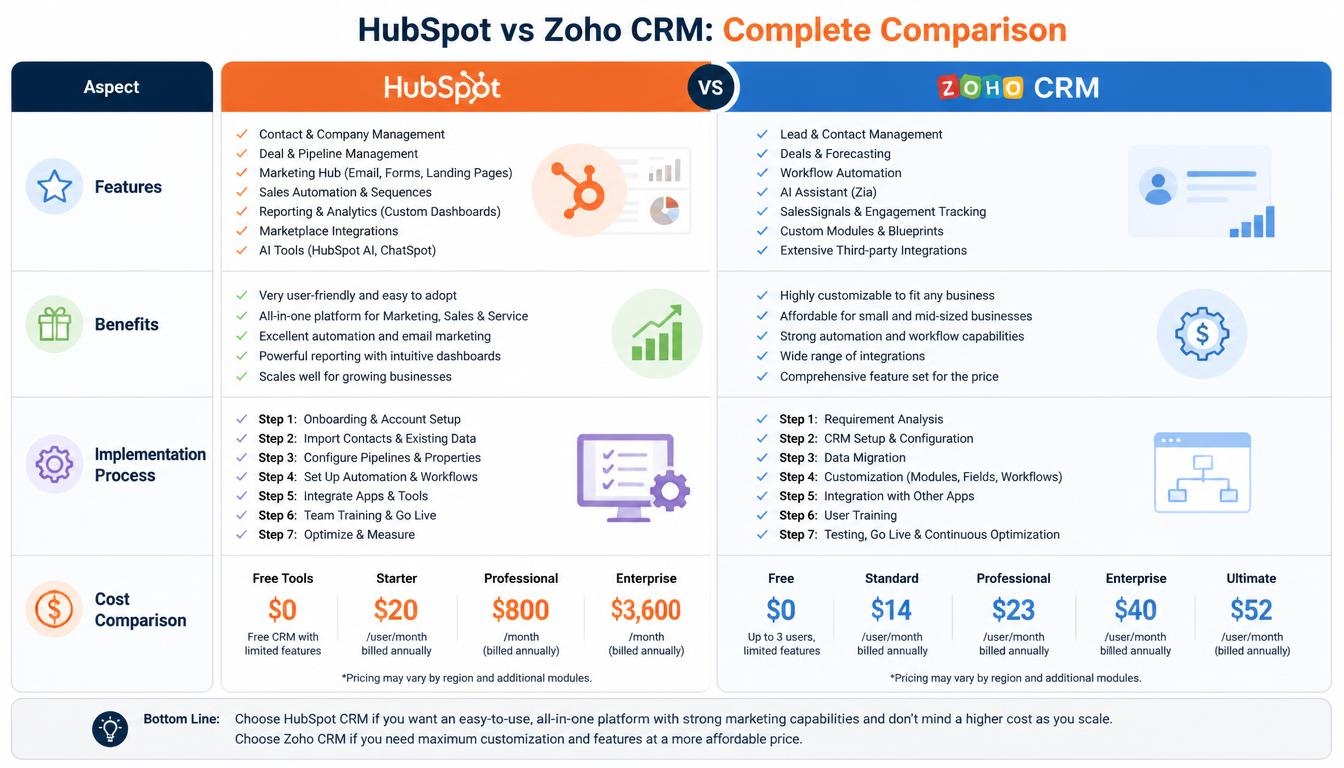
4. HubSpot vs Zoho CRM: Feature Comparison
Both platforms offer essential CRM capabilities, but their strengths and implementation approaches are different.
| Feature | HubSpot CRM | Zoho CRM |
|---|---|---|
| Lead Management | Yes | Yes |
| Contact Management | Yes | Yes |
| Account Management | Yes | Yes |
| Sales Pipelines | Yes | Yes |
| Email Integration | Yes | Yes |
| Marketing Automation | Through Marketing Hub | Through Zoho CRM and connected marketing apps |
| Workflow Automation | Yes | Yes |
| Custom Fields | Yes | Yes |
| Custom Modules / Objects | Available with plan limitations | Available with plan limitations |
| Sales Forecasting | Yes | Yes |
| AI Capabilities | Breeze and other AI tools | Zia |
| Reporting and Analytics | Yes | Yes |
| Customer Support Management | Service Hub | Zoho Desk integration and CRM capabilities |
| API Integration | Yes | Yes |
| Third-Party Integrations | Extensive ecosystem | Extensive ecosystem |
| Custom Development | APIs, webhooks and developer tools | APIs, custom functions and developer tools |
| Mobile Application | Yes | Yes |
Important: The availability and limits of individual features depend on the subscription, product bundle and account configuration. A feature being available on the platform does not necessarily mean it is included in every plan.
5. HubSpot vs Zoho CRM: Major Differences
Ease of Use
HubSpot is often preferred by businesses that want a straightforward CRM experience with connected sales and marketing tools.
Zoho CRM offers more configuration options, but a business may need additional planning to structure modules, fields, automation and integrations correctly.
Customization
Both platforms support customization.
Zoho provides custom modules, fields, functions and process configuration. HubSpot offers customizable properties, objects and developer capabilities, with some advanced functionality restricted to higher subscriptions.
The right choice depends on how closely the CRM needs to match the company’s existing business processes.
Marketing Automation
HubSpot has a strong focus on connecting marketing activities with sales processes through its Marketing Hub.
Zoho can also support marketing workflows through Zoho Campaigns, Zoho Marketing Automation and other connected applications.
Businesses should compare the complete application requirements rather than evaluating only the basic CRM subscription.
Workflow Automation
Both platforms can automate repetitive tasks.
For example, a business can automatically assign new leads, notify sales representatives, update deal stages and schedule follow-up activities.
Zoho offers several configurable CRM automation tools. HubSpot provides workflow automation with functionality and limits depending on the selected Hub subscription.
Integrations
HubSpot provides a large integration ecosystem and developer tools for connecting external applications.
Zoho offers integrations within its own business application ecosystem, along with APIs and custom development options.
For businesses using custom websites, accounting platforms, ERP software or internal applications, integration requirements should be evaluated before selecting a CRM.
6. AI Capabilities: HubSpot Breeze vs Zoho Zia
AI is becoming an important part of modern CRM systems. Both platforms offer AI-related capabilities, but their features and implementation options differ.
HubSpot Breeze
HubSpot’s Breeze ecosystem provides AI-powered tools across customer-facing and internal business workflows.
Potential use cases include:
- AI-assisted content creation.
- Sales prospecting support.
- Customer service assistance.
- Data enrichment and customer insights.
- Support for marketing and sales activities.
- AI-assisted workflow operations.
Zoho Zia
Zoho Zia provides AI capabilities within the Zoho ecosystem.
Its use cases include:
- Lead and deal predictions.
- Sales recommendations.
- Data and trend analysis.
- AI-assisted customer insights.
- Predictions related to business performance.
- Intelligent assistance for selected CRM activities.
Can Businesses Build Custom AI Features?
Yes. Businesses may need AI functionality beyond the features available in their CRM subscription.
For example, a company could build a custom AI assistant that:
- Reads incoming customer enquiries.
- Identifies the type of enquiry.
- Retrieves relevant customer information.
- Suggests an appropriate response.
- Creates or updates a CRM record.
- Assigns the enquiry to the right team.
This type of functionality can be developed using CRM APIs, custom backend services and AI integrations, subject to appropriate access controls and human review.
7. HubSpot CRM Pricing in USD
HubSpot provides free tools and paid subscriptions. Pricing depends on the Hub, subscription level, billing arrangement and number and type of seats.
The following is a reference for Sales Hub pricing in USD, rather than the price of every HubSpot product.
| Plan | Reference price |
|---|---|
| Free | $0 for up to 2 users |
| Starter | $20 per seat/month standard price |
| Professional | $100 per Sales seat/month |
| Enterprise | $150 per Sales seat/month |
HubSpot may display promotional Starter pricing for eligible new customers. The offer can differ from the standard price.
Professional and Enterprise plans also have required one-time onboarding fees listed separately:
- Professional: $1,500.
- Enterprise: $3,500.
Additional seats, HubSpot Credits, other Hubs, add-ons and applicable taxes can increase the total cost.
For example, using the standard Sales Hub reference prices:
| Plan | Example monthly cost for 5 paid seats |
|---|---|
| Starter | $100 |
| Professional | $500 |
| Enterprise | $750 |
These examples exclude onboarding fees, taxes, add-ons and any promotional pricing.
Businesses should confirm the final subscription configuration directly with HubSpot before purchasing.
8. Zoho CRM Pricing in USD
Zoho CRM offers different editions for businesses with different sales and operational requirements.
The following table shows the reference US pricing displayed by Zoho.
| Edition | Annual billing (per user/month) | Monthly billing (per user/month) |
|---|---|---|
| Free | $0 (up to 3 users) | $0 (up to 3 users) |
| Standard | $14 | $20 |
| Professional | $23 | $35 |
| Enterprise | $40 | $50 |
| Ultimate | $52 | $65 |
Local taxes may apply. Features, limits and availability differ between editions.
Example: Zoho CRM Cost for 5 Users
Using annual billing:
| Edition | Monthly subscription for 5 users |
|---|---|
| Standard | $70 |
| Professional | $115 |
| Enterprise | $200 |
| Ultimate | $260 |
These figures represent subscription costs only. They do not include CRM implementation, customization, integration or ongoing maintenance services.
9. HubSpot vs Zoho CRM: Which Is More Affordable?
At the entry level, Zoho CRM generally offers a lower per-user subscription cost than HubSpot Sales Hub’s standard Starter price.
However, subscription price alone should not determine the final decision.
For example:
- A business that needs connected sales and marketing tools may find HubSpot’s broader ecosystem useful.
- A company with specific internal workflows may benefit from Zoho’s customization options.
- A business already using Zoho Books, Zoho Desk or other Zoho applications may find it practical to extend its existing ecosystem.
- A company using several external platforms may need to compare integration costs and technical requirements for both systems.
The total cost of ownership should include subscriptions, onboarding, data migration, customization, third-party integrations, training and ongoing support.
10. CRM Implementation: Step-by-Step Process
Selecting a CRM is only the first step. Proper implementation is important to make sure the system reflects actual business processes and is adopted by the team.
A typical CRM implementation project includes the following stages.
Step 1: Understand Business Requirements
The first step is to understand how the company currently manages leads, customers, sales activities and follow-ups.
Important questions include:
- How does the business receive new enquiries?
- How many sales pipelines are required?
- Which teams need CRM access?
- What information should be collected from customers?
- Which tasks should be automated?
- Which external applications need to be connected?
Step 2: Select the CRM Platform
Based on the requirements, businesses can select HubSpot or Zoho CRM.
The decision should consider functionality, customization, integrations, subscription costs and future growth.
Step 3: Design CRM Structure
Before configuring the CRM, define the structure of the system.
This includes:
- Leads and contacts.
- Companies and accounts.
- Sales pipelines.
- Deal stages.
- Custom fields.
- User roles and permissions.
- Reporting requirements.
A well-planned structure helps avoid unnecessary complexity later.
Step 4: CRM Configuration and Customization
Configure the selected CRM according to the business requirements.
This may include custom fields, modules, properties, pipelines, dashboards, forms, workflows and approval processes.
Step 5: Data Migration
Existing customer records may be stored in spreadsheets, older CRM platforms or internal databases.
Data migration involves:
- Reviewing existing records.
- Identifying duplicate information.
- Mapping existing fields to CRM fields.
- Cleaning and validating data.
- Importing records.
- Checking data accuracy after migration.
Step 6: Integration With Other Applications
Many businesses need their CRM to communicate with other applications.
Common integrations include:
- Business websites and enquiry forms.
- Email platforms.
- Accounting software.
- ERP systems.
- E-commerce applications.
- Customer support systems.
- Payment platforms.
- Internal business applications.
Integrations can use native connectors, APIs, webhooks or custom middleware depending on the systems involved.
Step 7: Workflow Automation
Once the CRM structure is ready, configure the automation required by the business.
Examples include automatic lead assignment, follow-up reminders, email notifications, deal updates and approval workflows.
Step 8: Testing and User Training
Before launch, test the system with real business scenarios.
Check data accuracy, permissions, integrations, notifications, automation and reporting.
Train employees so they understand how to use the CRM in their daily work.
Step 9: Deployment and Ongoing Improvement
After testing, deploy the CRM for regular business use.
Monitor adoption, workflow performance, data quality and user feedback. Improve the configuration as business requirements change.
11. HubSpot CRM vs Zoho CRM: Implementation Cost
CRM subscription fees are only one part of the overall investment. Businesses may also need professional services for configuration, customization, migration and integrations.
The following are indicative project-budget ranges in USD for implementation services. Actual costs depend on scope, data quality, integrations, technical complexity and the delivery team.
| Implementation level | Indicative project cost | Typical duration |
|---|---|---|
| Basic CRM setup | $300–$700 | 1–2 weeks |
| Intermediate implementation | $700–$1,800 | 2–4 weeks |
| Advanced CRM customization | $1,800–$4,800 | 4–8 weeks |
| Enterprise CRM implementation | $4,800–$12,000+ | 2–4 months or more |
What Affects CRM Implementation Cost?
1. Number of Users
A larger team may require more user roles, permissions, pipelines and reporting configurations.
2. Customization Requirements
Custom modules, properties, functions, dashboards and business logic can increase development effort.
3. Data Migration
Migrating large datasets from older systems may require data cleaning, field mapping, duplicate handling and validation.
4. Third-Party Integrations
Connecting the CRM with ERP, accounting, e-commerce, websites and internal applications can add development and testing work.
5. Workflow Automation
Complex approval processes, conditional workflows and multi-department automation require additional planning and implementation.
6. Ongoing Maintenance
Businesses may also need continued support for system updates, integration monitoring, troubleshooting and future improvements.
These estimates are project-budget illustrations, not fixed vendor prices or quotations. A detailed scope assessment is needed before confirming a project fee.
12. How Xenixsoft Can Help With Zoho CRM and HubSpot CRM
Selecting a CRM platform is important, but configuring it correctly is what makes it useful for everyday business operations.
Xenixsoft helps businesses implement, customize and integrate both Zoho CRM and HubSpot CRM according to their sales processes, customer management requirements and existing technology environment.
The objective is not simply to install a CRM. It is to build a connected business system that helps teams manage customer information, reduce repetitive work and maintain visibility across the sales process.
A. Zoho CRM Implementation and Customization
Xenixsoft can help businesses configure Zoho CRM around their specific operational requirements.
1. Zoho CRM Setup and Configuration
- Configure the CRM account and business settings.
- Set up leads, contacts, accounts and deals.
- Create sales pipelines and deal stages.
- Configure users, roles and permissions.
- Set up fields, layouts and business-specific modules.
2. Custom Zoho CRM Development
When standard CRM functionality is not sufficient, Xenixsoft can extend the system through available Zoho development tools and APIs.
Examples include:
- Custom modules and fields.
- Custom functions and business logic.
- Automated record updates.
- Custom buttons and actions.
- Approval processes.
- Business-specific dashboards and reports.
3. Zoho Workflow Automation
Xenixsoft can configure workflows to reduce repetitive manual activities.
For example, when a new lead arrives, the CRM can check its source, assign it to the appropriate sales representative, create a follow-up task and notify the relevant team.
4. Zoho CRM Integrations
Xenixsoft can connect Zoho CRM with:
- Zoho Books and other Zoho applications.
- Business websites and enquiry forms.
- E-commerce platforms.
- ERP and accounting systems.
- External APIs and internal business applications.
- Email and customer support platforms.
5. Data Migration and CRM Maintenance
Xenixsoft can help migrate customer data from spreadsheets or existing CRM systems, validate records and provide ongoing technical support.
B. HubSpot CRM Implementation and Custom Development
For businesses using HubSpot, Xenixsoft can help configure the platform and extend it to support their sales, marketing and customer service operations.
1. HubSpot CRM Setup
- Configure contacts, companies, deals and tickets.
- Set up sales pipelines and deal stages.
- Configure properties and record layouts.
- Define user permissions and team access.
- Organize CRM data and reporting requirements.
2. HubSpot Sales and Marketing Automation
Xenixsoft can help configure business workflows such as:
- Automatic lead assignment.
- Follow-up reminders and notifications.
- Lead qualification workflows.
- Deal-stage updates.
- Customer onboarding processes.
- Sales and marketing handover workflows.
Advanced automation availability depends on the HubSpot subscription.
3. Custom HubSpot Development
When a business needs functionality beyond its standard setup, Xenixsoft can work with HubSpot APIs, webhooks and supported developer tools.
Possible development work includes:
- Custom CRM integrations.
- Custom-coded extensions and actions where supported.
- Data synchronization services.
- Custom dashboards and reporting integrations.
- Business-specific automation.
- Connections with external applications.
4. HubSpot Website and Application Integration
A business may receive enquiries through multiple websites, landing pages or applications.
Xenixsoft can connect these systems with HubSpot so customer information can be captured and synchronized with the CRM.
Examples include:
- Website enquiry forms.
- Custom web applications.
- E-commerce platforms.
- Customer portals.
- External lead-generation systems.
- Internal business applications.
5. HubSpot Data Migration and Ongoing Support
Xenixsoft can assist with migrating records from spreadsheets or other CRM platforms, mapping properties, checking data accuracy and supporting the system after deployment.
C. Connecting CRM With Existing Business Systems
Many businesses use different applications for sales, finance, customer support, inventory and operations.
Xenixsoft can help connect these systems with Zoho or HubSpot to reduce disconnected data and repetitive manual work.
For example, a connected business workflow could look like this:
- A customer submits an enquiry through the company website.
- The enquiry is captured in Zoho CRM or HubSpot.
- The CRM assigns the lead to the appropriate team.
- The sales team updates the opportunity and customer details.
- Once a deal is confirmed, relevant information is shared with the connected accounting or operational system.
- Customer information remains synchronized according to the agreed integration rules.
The exact workflow depends on the business systems, API capabilities and data ownership requirements.
D. Custom AI and Business Automation
Businesses may also want to extend their CRM with AI-powered capabilities.
Depending on the use case, Xenixsoft can develop integrations that help with:
- AI-assisted lead classification.
- Customer enquiry categorization.
- Document and form data extraction.
- Internal knowledge assistants.
- Automated data processing.
- Customer support assistance.
- CRM-connected business workflows.
Custom AI functionality should be designed with appropriate permissions, data protection and human approval for important business decisions.
E. How Xenixsoft Approaches a CRM Project
A typical project follows a structured process:
- Business discovery: Understand existing sales, marketing and customer management processes.
- Requirement analysis: Identify the CRM features, integrations and automation required.
- Platform configuration: Configure Zoho CRM or HubSpot according to the agreed scope.
- Custom development: Build additional functionality where standard features are insufficient.
- Integration: Connect websites, applications and external business systems.
- Data migration: Transfer and validate existing customer records.
- Testing: Verify workflows, permissions, integrations and reporting.
- Deployment and training: Prepare the system for regular business use.
- Ongoing support: Monitor integrations, resolve technical issues and improve the system as requirements evolve.
Whether a business needs a new CRM implementation, improvements to an existing setup or custom integrations, the work should be based on its actual processes rather than a one-size-fits-all configuration.
13. Which CRM Should You Choose?
There is no single CRM that is best for every business. The right choice depends on the company’s size, processes, existing applications and future requirements.
Choose HubSpot CRM If:
- You want sales and marketing activities connected in one platform.
- Your business prioritizes an easy-to-use CRM experience.
- You need structured sales pipelines and customer communication.
- You plan to use multiple HubSpot Hubs.
- Your team benefits from HubSpot’s integration ecosystem.
Choose Zoho CRM If:
- You need flexible CRM customization.
- Your business already uses Zoho applications.
- You require custom fields, modules and business workflows.
- You want to connect CRM with other operational systems.
- Subscription cost and configuration flexibility are important considerations.
Can a Business Switch From One CRM to Another?
Yes. Businesses can migrate from Zoho CRM to HubSpot or from HubSpot to Zoho.
However, migration requires careful planning.
Customer records, companies, deals, activities, notes, attachments, custom fields and automation rules may need different mapping approaches.
A migration should include data review, field mapping, duplicate management, test imports and post-migration validation. Some platform-specific workflows may need to be rebuilt rather than transferred directly.
14. Common CRM Implementation Mistakes to Avoid
Even a capable CRM platform can fail to deliver value if it is poorly configured.
Common mistakes include:
- Choosing a CRM without understanding business requirements.
- Creating too many unnecessary fields and modules.
- Importing unclean or duplicate customer data.
- Automating processes before defining them properly.
- Ignoring user permissions and data security.
- Failing to integrate important business applications.
- Not training employees.
- Selecting a subscription without checking feature limits.
- Failing to monitor CRM adoption and data quality.
A successful CRM implementation requires a balance between functionality, usability, integration and long-term maintainability.
Conclusion
HubSpot CRM and Zoho CRM are both capable platforms for managing customer relationships, sales pipelines and business operations.
HubSpot is a strong option for businesses looking for connected sales, marketing and customer service tools. Zoho CRM is attractive to businesses that need flexible customization and integration with a wider business application ecosystem.
The final decision should consider more than subscription prices. Business workflows, required integrations, customization, user adoption and long-term costs are equally important.
With the right implementation approach, both platforms can become an important part of a company’s business operations.
Xenixsoft helps businesses implement and extend Zoho CRM and HubSpot CRM through configuration, custom development, data migration, workflow automation and third-party integrations. The focus is on building a CRM environment that supports the way the business actually works.