
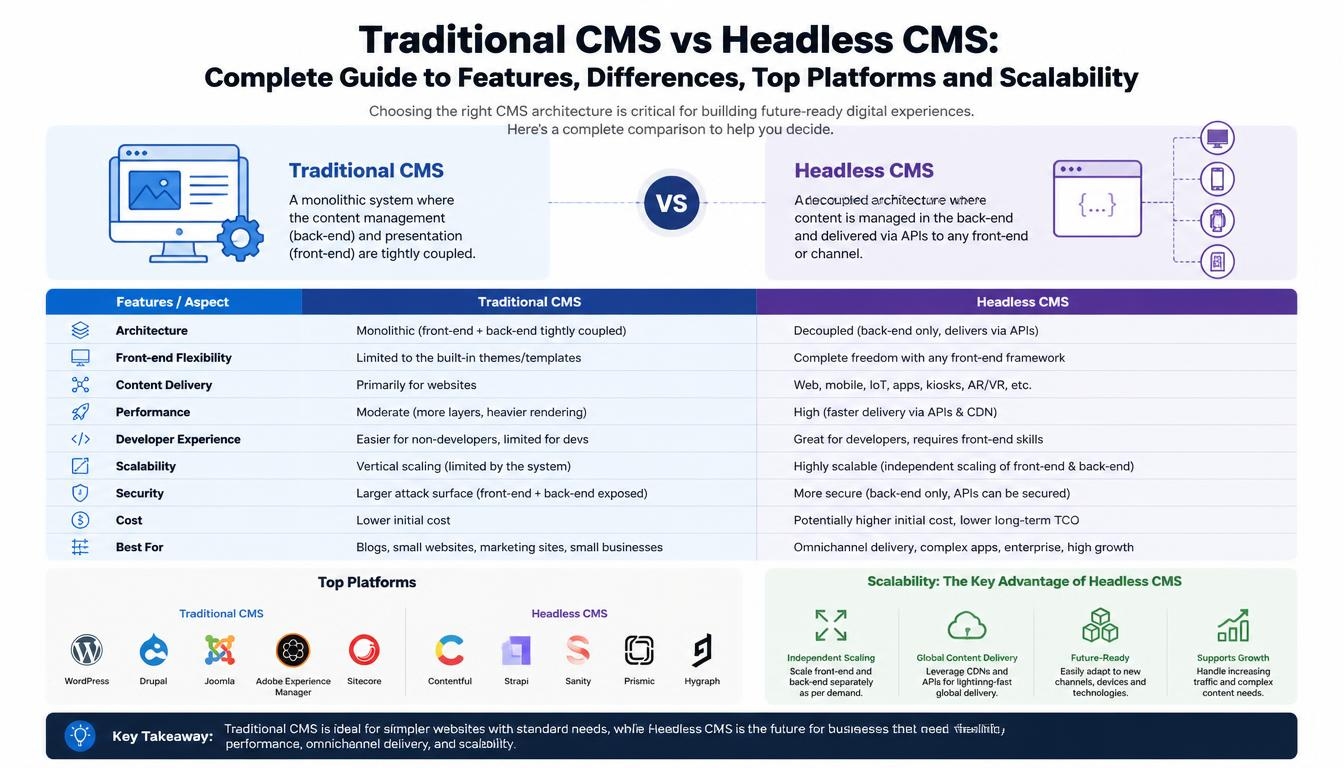
1. What Is a Traditional CMS?
A traditional CMS is a content management system in which the content management backend and website frontend are closely connected.
The CMS provides an administration panel where users can create pages, upload images, manage menus, publish articles and update website content. It also uses themes, templates and rendering functionality to display that content to website visitors.
For example, when a company publishes a new blog post in WordPress, the CMS stores the content and uses its theme and template system to generate the webpage.
The content management system and website presentation are generally managed within the same platform.
How Traditional CMS Architecture Works
A typical traditional CMS architecture includes:
- Content management: Administrators and editors create and update content.
- Database: Pages, posts, users, settings and other information are stored.
- Backend: The CMS manages content, users, permissions and business logic.
- Theme and templates: The presentation layer determines how content appears.
- Website delivery: The CMS generates pages for visitors.
This architecture is convenient for businesses that want to manage their website without maintaining a separate frontend application.
Popular Traditional CMS Platforms
<escape>**1.</escape> <escape>WordPress</escape>
<escape>WordPress</escape> is one of the most widely used CMS platforms for business websites, blogs, publishing platforms and e-commerce websites.
<escape>Key features:</escape>
- Theme-based website development.
- Plugin ecosystem.
- Content editor and media management.
- User roles and permissions.
- SEO plugins and integrations.
- E-commerce functionality through WooCommerce.
- REST API for external integrations and headless development.
Best suited for: Business websites, blogs, corporate websites, content publishing and small to medium-sized e-commerce projects.
<escape>**2.</escape> <escape>Drupal</escape>
<escape>Drupal</escape> is a flexible CMS designed for websites and applications with complex content structures, permissions, workflows and integrations.
Key features:
- Advanced content types and fields.
- User roles and access permissions.
- Multilingual content management.
- Editorial workflows.
- API-first capabilities.
- Complex data relationships.
- Enterprise website and portal development.
Best suited for: Enterprise websites, government portals, educational platforms, multilingual websites, membership portals and complex content-driven applications.
<escape>**3.</escape> <escape>Joomla</escape>
<escape>Joomla</escape> is another established CMS that provides content management, user access control, extensions and template-based website development.
Key features:
- Content and category management.
- User access control.
- Template customization.
- Extension ecosystem.
- Multilingual capabilities.
- Built-in content management functionality.
Best suited for: Community websites, membership platforms, portals and business websites requiring structured content management.
<escape>**4.</escape> <escape>TYPO3</escape>
<escape>TYPO3</escape> is an enterprise-oriented open-source CMS often used for complex corporate websites and multi-site publishing environments.
Key features:
- Multi-site management.
- Advanced user permissions.
- Multilingual publishing.
- Content workflows.
- Extensive configuration options.
- Enterprise content management capabilities.
Best suited for: Large corporate websites, multi-brand organizations, multilingual portals and complex publishing environments.
Other platforms worth considering: Webflow is a hosted visual website and CMS platform that is useful for design-focused marketing websites. Ghost is another option for publishing businesses, blogs and membership-based content. They are not direct architectural equivalents of every traditional CMS.
2. What Is a Headless CMS?
A headless CMS is a content management system that separates content storage and management from the frontend presentation layer.
Unlike a traditional CMS, a headless CMS does not normally generate the final website pages itself. Instead, it stores content in a structured format and makes it available through APIs.
Developers build a separate frontend using technologies such as React, Next.js, Vue.js or other frameworks. The frontend retrieves content from the CMS and displays it to users.
For example, a business might manage its products, articles and company information in one headless CMS and deliver that content to:
- Its main website.
- Mobile applications.
- Customer portals.
- E-commerce storefronts.
- Partner applications.
- Digital displays and other connected devices.
The same content can be reused across different digital platforms without maintaining separate content databases for each channel.
How Headless CMS Architecture Works
A typical headless CMS architecture includes:
- Content management: Editors create and manage structured content.
- Content storage: Content is stored in the CMS database or hosted content platform.
- API layer: REST or GraphQL APIs make content available to applications.
- Frontend application: Developers build the user interface using their preferred framework.
- Hosting and delivery: The frontend is deployed separately, often using cloud infrastructure and a CDN.
For example, a business could use a headless CMS with a Next.js frontend hosted on a modern cloud platform.
The CMS manages content, while the frontend controls website design, routing, rendering and user interactions.
Popular Headless CMS Platforms
<escape>**1.</escape> <escape>Contentful</escape>
<escape>Contentful</escape> is a cloud-based headless content platform designed for managing structured content and delivering it across different digital channels.
Key features:
- Structured content modelling.
- REST and GraphQL APIs.
- Content delivery and management APIs.
- Content localization.
- Editorial workflows.
- Integration capabilities.
- Multi-channel content delivery.
Best suited for: Enterprise businesses, multi-brand organizations, international websites and applications that need centralized content management.
<escape>**2.</escape> <escape>Sanity</escape>
<escape>Sanity</escape> is a developer-focused content platform that provides a customizable content management environment and structured content storage.
Key features:
- Customizable React-based Sanity Studio.
- Structured content modelling.
- GROQ and API-based content queries.
- Real-time collaboration.
- Visual editing and previews.
- Content localization.
- Developer tools and integrations.
Best suited for: Custom websites, content-driven applications, developer-led teams and businesses requiring flexible content structures.
<escape>**3.</escape> <escape>Strapi</escape>
<escape>Strapi</escape> is an open-source headless CMS built on Node.js. It gives developers control over content models, APIs, plugins and deployment.
Key features:
- Open-source core.
- Self-hosting options.
- Content-type builder.
- REST and GraphQL API options.
- Role-based access control.
- Plugin architecture.
- Custom backend development.
- Integration with modern frontend frameworks.
Best suited for: Startups, custom web applications, businesses requiring infrastructure control and projects where developers want to manage their own CMS environment.
<escape>**4.</escape> <escape>Storyblok</escape>
<escape>Storyblok</escape> is a headless CMS that combines structured content management with a visual editing experience.
Key features:
- Visual Editor.
- Component-based content structures.
- Live content previews.
- Content delivery APIs.
- Localization.
- Publishing workflows.
- Frontend framework integrations.
Best suited for: Marketing websites, multi-language websites, content-heavy business platforms and teams that want headless architecture without losing visual editing capabilities.
<escape>**5.</escape> <escape>Payload CMS</escape>
<escape>Payload</escape> is a developer-oriented, open-source CMS built around TypeScript and Node.js.
Key features:
- TypeScript-based configuration.
- Custom content collections.
- Access control.
- REST and GraphQL APIs.
- Admin panel customization.
- Database integrations.
- Custom business logic.
- Integration with Next.js.
Best suited for: Custom web applications, Next.js projects, SaaS platforms and businesses that want CMS functionality integrated closely with their application architecture.
<escape>**6.</escape> <escape>Directus</escape>
<escape>Directus</escape> provides a data platform and content management interface that can work with SQL databases.
Key features:
- Database-driven content management.
- REST and GraphQL APIs.
- Visual administration interface.
- User permissions.
- Workflow and automation options.
- Custom extensions.
- Flexible data management.
Best suited for: Data-driven applications, internal business platforms, enterprise dashboards and projects that need to manage structured data through an API.
Other headless platforms worth evaluating: Contentstack, Hygraph and Prismic are additional options, particularly for businesses looking for hosted content management and multi-channel publishing.
3. Traditional CMS vs Headless CMS: Architecture Differences
The biggest difference between the two approaches is how content management and frontend presentation are connected.
Traditional CMS Architecture
In a traditional CMS, the content backend and frontend presentation are part of the same overall application.
For example:
- WordPress manages content and renders website pages.
- Drupal manages content, permissions and website presentation.
- Joomla manages content and displays it through templates.
The CMS is responsible for both managing content and generating the website.
Headless CMS Architecture
In a headless CMS, content management and frontend development are separate components.
For example:
- Strapi stores content and provides APIs.
- Next.js retrieves content from Strapi.
- The Next.js application renders the website.
- A separate mobile application can retrieve the same content through the API.
This separation gives developers more control over how content is presented and reused.
Architecture Comparison
| Component | Traditional CMS | Headless CMS |
|---|---|---|
| Content management | Built into CMS | Separate CMS backend |
| Frontend | Usually integrated | Independently developed |
| Page rendering | CMS themes/templates | Frontend application |
| Content delivery | Primarily website-oriented | API-based |
| Database | Managed by CMS | Managed by CMS or platform |
| API integration | Available, depending on CMS | Central part of architecture |
| Frontend framework | Often CMS-specific | Flexible framework choice |
| Hosting | Often one application environment | CMS and frontend may be hosted separately |
4. Traditional CMS vs Headless CMS: Feature Comparison
| Feature | Traditional CMS | Headless CMS |
|---|---|---|
| Content Management | Built in | Built in |
| Theme and Template System | Usually built in | Developed separately |
| Visual Page Editing | Commonly available | Depends on platform and integration |
| Custom Frontend | Possible, with CMS integration | Full frontend control |
| REST API | Available on many platforms | Core delivery mechanism |
| GraphQL | Available through platform or extensions | Available on many platforms |
| Multilingual Content | Supported by many platforms | Supported by many platforms |
| SEO Management | Often available through core or plugins | Must be implemented in the frontend |
| E-commerce | Plugins or integrated solutions | Requires APIs and commerce integrations |
| Mobile App Integration | Possible through APIs | Strong fit for multi-channel delivery |
| Content Reusability | Depends on content structure | Central architectural capability |
| Development Flexibility | Depends on CMS architecture | High frontend flexibility |
| Developer Dependency | Often lower for routine publishing | Generally higher |
| Initial Development | Often faster | Usually more planning and development |
| Infrastructure Control | Depends on hosting model | Depends on CMS and frontend hosting choices |
5. Scalability: Which CMS Can Handle More Traffic and Content?
Scalability is one of the most important considerations when choosing a CMS.
However, it is a mistake to assume that every headless CMS automatically performs better than every traditional CMS.
Scalability depends on the overall architecture, database design, caching, hosting infrastructure, content delivery, application code and traffic patterns.
Scalability in Traditional CMS
Traditional CMS platforms can support large websites and high traffic when properly configured.
For example, a WordPress or Drupal website can be scaled using:
- Cloud hosting.
- CDN integration.
- Page and application caching.
- Database optimization.
- Load balancing.
- Optimized images and media delivery.
- Background processing.
- Infrastructure monitoring.
For a content-heavy website, effective caching can reduce repeated database queries and improve response times.
However, heavily customized themes, excessive plugins, inefficient queries and poorly designed modules can create performance and maintenance challenges.
Scalability in Headless CMS
Headless architecture provides more flexibility to scale the frontend and content services independently.
For example, an application could use:
- A managed headless CMS for content.
- Next.js for frontend rendering.
- A CDN for static assets and cached pages.
- Cloud services for application APIs.
- Redis for selected caching requirements.
- PostgreSQL for custom application data.
- Background queues for processing intensive tasks.
The frontend can be optimized and deployed independently of the content management platform.
This approach is useful when a business needs to deliver content across multiple applications or handle different traffic patterns across its services.
However, developers must also manage API performance, frontend caching, preview systems, deployments, integrations and monitoring.
Scalability Comparison
| Scalability factor | Traditional CMS | Headless CMS |
|---|---|---|
| High website traffic | Possible with optimization | Possible with optimized frontend and delivery |
| Content growth | Supported | Supported |
| Multiple websites | Supported by suitable platforms | Strong fit for shared content models |
| Mobile application delivery | Requires API integration | Designed for API-based delivery |
| Independent frontend scaling | More tightly coupled | Easier to separate |
| CDN integration | Supported | Commonly used |
| Infrastructure management | Often simpler | More distributed |
| Performance optimization | CMS, database and cache focused | Frontend, API, CDN and cache focused |
Important: Neither architecture guarantees better scalability. A well-engineered traditional CMS can outperform a poorly implemented headless application. The decision should be based on expected traffic, content delivery needs and the engineering team’s ability to operate the system.
6. SEO: Traditional CMS vs Headless CMS
Search engine optimization is another important consideration.
Both architectures can support strong SEO, but the implementation approach differs.
SEO in Traditional CMS
Traditional CMS platforms often provide a convenient SEO workflow through built-in capabilities, plugins or extensions.
Common features include:
- Meta title and description management.
- XML sitemap generation.
- Canonical URLs.
- Redirect management.
- Structured data integrations.
- Image alt text.
- URL customization.
- Social sharing metadata.
For example, WordPress websites can use SEO plugins to manage many of these requirements without building a separate SEO system.
SEO in Headless CMS
Headless CMS platforms generally store SEO information as structured content fields. The frontend application is responsible for using those fields correctly.
Developers need to implement:
- Dynamic page titles and meta descriptions.
- Canonical URLs.
- XML sitemaps.
- Robots directives.
- Structured data.
- Open Graph and social metadata.
- Redirect handling.
- Correct heading structure.
- Server-side rendering or static generation where appropriate.
Frameworks such as Next.js can support SEO-friendly rendering strategies, but the implementation must be designed correctly.
Which is better for SEO?
Neither architecture automatically ranks higher in search engines. Search performance depends on content quality, technical SEO, rendering, page speed, accessibility, internal linking and the overall website experience.
A traditional CMS may make SEO management easier for a small marketing team, while a headless setup can provide more technical control when the development team implements SEO properly.
7. Security and Maintenance Differences
Security should be evaluated as part of the complete application architecture, not simply by choosing traditional or headless.
Traditional CMS Security
A traditional CMS commonly includes content management, user authentication, plugins, themes and backend functionality within the same application.
Important security practices include:
- Keeping the CMS core updated.
- Updating themes and extensions.
- Using appropriate user permissions.
- Implementing strong authentication.
- Applying security patches.
- Performing regular backups.
- Monitoring server activity.
- Reviewing third-party extensions.
Headless CMS Security
Headless architecture separates the content management backend from the public-facing frontend.
This can reduce direct exposure of some backend components, but it introduces additional security responsibilities.
Important practices include:
- Protecting API credentials.
- Using appropriate authentication.
- Restricting API permissions.
- Separating public and private content.
- Securing preview environments.
- Validating incoming data.
- Monitoring API usage.
- Protecting application infrastructure.
- Managing secrets and environment variables.
For self-hosted platforms such as Strapi or Payload, the business is also responsible for securing and maintaining the hosting environment.
8. Development Cost: Traditional CMS vs Headless CMS
Development cost depends on the project scope, design complexity, functionality, integrations, content migration and team experience.
Traditional CMS projects can often be launched more quickly when existing themes, plugins and built-in features meet the requirements.
Headless CMS projects generally require additional frontend development and integration work, although the effort can be worthwhile for multi-channel or highly customized applications.
What Affects Development Cost?
1. Design and Frontend Complexity
A custom frontend with advanced interactions, animations and responsive layouts requires more development than a standard theme-based website.
2. Content Structure
A website with a few standard pages is less complex than a platform with hundreds of content types, relationships and publishing workflows.
3. Integrations
Connecting CRM, ERP, payment gateways, external APIs and other applications can increase project effort.
4. Custom Functionality
Advanced search, customer dashboards, personalized content, user accounts and business-specific workflows require additional development.
5. Hosting and Infrastructure
A headless architecture may involve separate CMS, frontend, database, CDN and application services. These need to be considered in the operating budget.
6. Maintenance
Both approaches require ongoing security updates, monitoring, backups and technical support.
9. Traditional CMS vs Headless CMS: Which One Should You Choose?
The best architecture depends on what the business wants to build and how it plans to manage content in the future.
Choose a Traditional CMS If:
- You need a business or corporate website.
- Your primary requirement is managing one website.
- Your marketing team frequently publishes blogs and pages.
- You want built-in themes and content editing.
- You have a limited development budget.
- You want to launch the website relatively quickly.
- You do not need the same content delivered to multiple applications.
Example: A small or medium-sized business needs a corporate website with service pages, blogs, contact forms, case studies and SEO management. A traditional CMS may be the most practical choice.
Choose a Headless CMS If:
- You need content across websites and mobile applications.
- You are developing a custom frontend.
- You require extensive frontend flexibility.
- You need structured content shared across multiple platforms.
- You have an experienced development team.
- Your business expects complex integrations.
- You want to scale frontend applications independently.
Example: An e-commerce company manages product information, descriptions, images and promotional content in one CMS. It delivers that content to a website, mobile application and partner platform. A headless architecture may be a suitable option.
What About a Hybrid CMS?
There is another option: a hybrid or decoupled CMS.
A hybrid approach combines traditional CMS content management capabilities with API-based content delivery.
For example, Drupal can render its own website pages while also exposing content through its JSON module. WordPress can similarly serve its own frontend while exposing content through its REST API.
This means businesses do not always have to choose between a traditional and a headless platform.
A hybrid architecture can be useful when a company wants familiar editorial tools while gradually introducing custom frontend applications or additional delivery channels.
10. CMS Selection Based on Business Requirements
The following table provides a practical starting point for selecting a CMS architecture.
| Business requirement | Recommended approach | Example platforms |
|---|---|---|
| Small business website | Traditional | WordPress |
| Corporate website | Traditional or hybrid | WordPress, Drupal |
| Government portal | Traditional or hybrid | Drupal, TYPO3 |
| Multilingual website | Traditional, hybrid or headless | Drupal, TYPO3, Contentful |
| Blog and publishing platform | Traditional | WordPress, Ghost |
| Custom SaaS application | Headless or integrated CMS | Payload, Strapi, Sanity |
| Multi-channel content delivery | Headless | Contentful, Sanity, Strapi |
| Custom e-commerce frontend | Headless or hybrid | Storyblok, Contentful, Strapi |
| Next.js application | Headless or integrated | Payload, Sanity, Strapi |
| Data-driven business platform | Headless | Directus, Strapi |
| Design-focused marketing website | Hosted visual CMS | Webflow |
These are suggested starting points, not strict technical limitations. Many platforms support multiple architectural approaches.
11. Can You Convert a Traditional CMS Into a Headless CMS?
Yes. Businesses do not always need to replace their existing CMS to adopt headless architecture.
For example, an existing WordPress or Drupal website can expose content through APIs. A separate frontend can then retrieve the content and render it using React or Next.js.
A typical migration or decoupling process includes:
- Reviewing the existing CMS and content structure.
- Identifying which content needs to be exposed through APIs.
- Reviewing available REST or GraphQL capabilities.
- Planning the frontend architecture.
- Developing the new frontend.
- Connecting the frontend with the CMS.
- Implementing SEO, routing and content previews.
- Testing content delivery and publishing workflows.
- Migrating or redirecting existing URLs where required.
- Deploying the new architecture and monitoring performance.
Example: Moving From Traditional WordPress to Headless WordPress
A business already has a WordPress website but wants to build a separate Next.js frontend.
The architecture could look like this:
- WordPress: Content management and editorial administration.
- WordPress REST API: Content delivery.
- Next.js: Frontend application.
- PostgreSQL or another application database: Optional custom business data.
- CDN: Asset and page delivery.
- Cloud hosting: Frontend deployment.
The business can continue managing its content through WordPress while the new frontend handles the visitor experience.
The same general approach can be used with Drupal and its JSON capabilities.
12. Common Mistakes When Choosing a CMS
Before selecting a CMS, businesses should avoid several common mistakes.
1. Choosing Headless Only Because It Is Newer
Headless architecture is not automatically the best choice. A simple business website may not benefit enough to justify the additional development and maintenance.
2. Ignoring the Editorial Experience
Marketing teams need an interface where they can create, edit, preview and publish content without depending on developers for every small change.
3. Underestimating Frontend Development
A headless CMS does not automatically provide the finished website. The frontend, templates, navigation, SEO, preview functionality and deployment still need to be built.
4. Ignoring Long-Term Maintenance
Both approaches require updates, security reviews, backups and technical support. Headless architecture can also involve more separate services to monitor.
5. Not Planning for Future Integrations
If a business expects to add mobile apps, CRM systems, customer portals or multiple websites, these requirements should be considered during architecture planning.
6. Overcomplicating a Simple Project
Using multiple services and frameworks for a basic website can increase costs without providing meaningful business benefits.
13. How Xenixsoft Can Help With Traditional and Headless CMS Development
Selecting the CMS architecture is only one part of a successful website or application project. The content structure, frontend technology, integrations, hosting and long-term maintenance strategy are equally important.
Xenixsoft helps businesses plan and develop traditional CMS websites, headless CMS platforms and custom digital applications based on their functional and technical requirements.
A. Traditional CMS Development
For businesses that need a conventional website or content management platform, Xenixsoft can help with:
- Business and corporate website development.
- CMS setup and configuration.
- Custom themes and templates.
- Content structure and management.
- Custom modules and functionality.
- Multilingual website development.
- E-commerce functionality.
- Website migration and modernization.
- Security updates and ongoing maintenance.
B. Headless CMS Development
For businesses that need a separate frontend and API-based content delivery, Xenixsoft can develop solutions using modern CMS and frontend technologies.
Headless CMS platforms:
- Strapi.
- Sanity.
- Contentful.
- Storyblok.
- Payload CMS.
- Directus.
Frontend technologies:
- Next.js.
- React.js.
- TypeScript.
- Modern JavaScript frameworks.
Backend and integration technologies:
- Node.js.
- Python and FastAPI.
- REST and GraphQL APIs.
- PostgreSQL.
- Redis.
- Cloud infrastructure.
The final technology stack depends on the application requirements and the selected CMS platform.
C. Headless E-commerce Development
Businesses that need more control over their online shopping experience may benefit from a headless or composable e-commerce architecture.
Xenixsoft can help develop:
- Custom product catalogues.
- Product content management.
- Custom storefronts.
- Customer accounts and dashboards.
- Shopping cart and checkout integrations.
- Payment gateway connections.
- Inventory and order integrations.
- Product search and filtering.
- CRM and ERP integrations.
A headless CMS can manage product content, while a dedicated commerce engine handles product pricing, carts, orders and payments. These responsibilities should be clearly separated during architecture planning.
D. CMS Migration and Modernization
Businesses may already have websites built on older CMS platforms or custom applications.
Xenixsoft can help assess the existing system and plan a migration or modernization project.
This may include:
- Traditional CMS to headless CMS migration.
- WordPress or Drupal decoupling.
- CMS version upgrades.
- Content migration and restructuring.
- Frontend modernization using Next.js.
- API development and integration.
- Performance optimization.
- SEO preservation and URL redirects.
A migration should be planned carefully to protect existing content, URLs, search visibility and business operations.
E. CMS Integration With Business Applications
A CMS often needs to work with other business systems.
Xenixsoft can develop integrations with:
- Zoho CRM and HubSpot CRM.
- ERP and accounting applications.
- E-commerce systems.
- Customer portals.
- Marketing automation platforms.
- External APIs.
- Custom business applications.
These integrations can help businesses manage content and customer information across their digital systems.
F. Our Development Approach
A typical CMS project follows these stages:
- Requirement analysis: Understand the website, content, business workflows and technical requirements.
- Architecture planning: Decide between traditional, headless or hybrid architecture.
- Technology selection: Choose the CMS, frontend, backend and hosting environment.
- UI/UX design: Prepare the website or application experience.
- CMS development: Configure content types, permissions and editorial workflows.
- Frontend development: Build responsive pages and application components.
- API and integration development: Connect the CMS with required business systems.
- Testing: Check functionality, security, accessibility, SEO and performance.
- Deployment: Launch the website or application.
- Maintenance: Monitor performance, apply updates and support future improvements.
The goal is to select an architecture that meets the current requirements without creating unnecessary complexity for future development.
Conclusion
Traditional CMS and headless CMS platforms solve different content management requirements.
Traditional CMS platforms such as WordPress, Drupal, Joomla and TYPO3 remain practical choices for many business websites, corporate portals and publishing platforms. They provide established content management and website presentation capabilities.
Headless CMS platforms such as Contentful, Sanity, Strapi, Storyblok, Payload and Directus offer a different approach by separating content management from frontend development. They are particularly useful for businesses delivering content across websites, mobile applications and other digital channels.
The best choice is not necessarily the newest or most technically advanced platform. It is the architecture that fits the business requirements, available development resources, content strategy, expected growth and long-term budget.
Before selecting a CMS, businesses should evaluate how content will be created, managed, delivered and maintained over time.
Xenixsoft helps businesses build and modernize traditional CMS websites, headless content platforms and custom web applications with an architecture selected around real business requirements.