
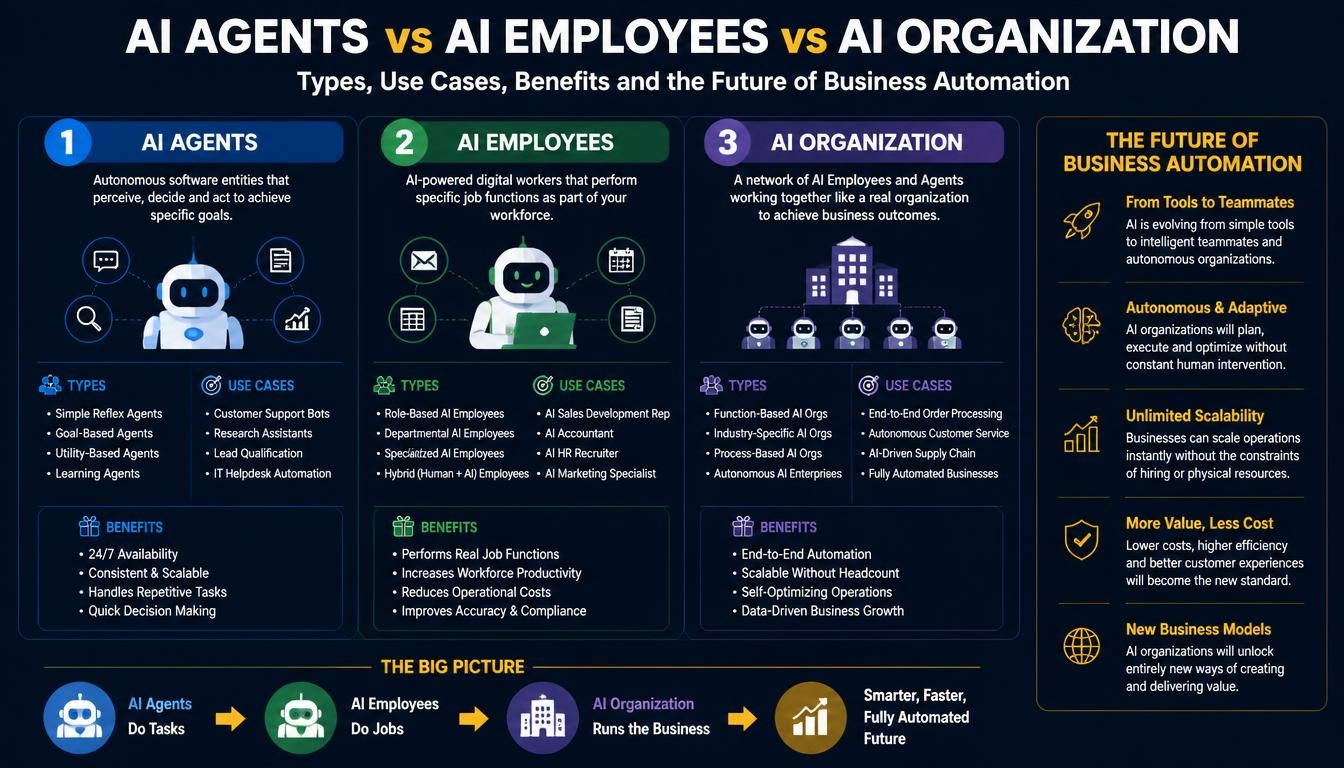
1. What Is an AI Agent?
An AI agent is a software system that uses artificial intelligence to understand a task, make decisions, access tools and perform actions toward a defined goal.
Unlike a traditional chatbot that primarily responds to questions, an AI agent can interact with external applications and execute multiple steps.
For example, a customer asks about an order.
A basic chatbot may explain the order-tracking process. An AI agent can:
- Understand the customer’s request.
- Retrieve the order number.
- Connect to the order management system.
- Check the latest order status.
- Identify whether there is a delivery delay.
- Provide an appropriate response.
- Create a support ticket if further assistance is needed.
The agent does not simply generate a response. It uses connected systems to complete part of the workflow.
How Does an AI Agent Work?
A typical AI agent contains several components.
1. AI Model
The model interprets instructions, understands user requests and supports reasoning and decision-making.
2. Instructions and Objectives
The agent receives a defined role, task, operating instructions and restrictions.
3. Tools and Integrations
Tools allow the agent to access databases, APIs, CRM systems, websites, email platforms and other applications.
4. Context and Memory
The agent can use relevant conversation history, business information and previous task results, depending on how the application is designed.
5. Execution and Orchestration
The agent determines which steps to perform, calls the appropriate tools and processes their results.
6. Guardrails and Monitoring
Security rules, permission controls, validation and monitoring help prevent inappropriate or incorrect actions.
Example: AI Sales Agent
Imagine a company receives 100 enquiries every day through its website.
An AI sales agent can:
- Read incoming enquiries.
- Identify the product or service requested.
- Extract customer details.
- Categorize the lead.
- Check whether the customer matches the target market.
- Create a lead in the CRM.
- Assign it to an appropriate sales representative.
- Prepare a follow-up message.
The sales team can then concentrate on qualified opportunities instead of manually processing every enquiry.
2. What Is an AI Employee?
An AI employee is a role-oriented AI system designed to perform a broader set of responsibilities associated with a particular business function.
The term describes a business operating concept rather than a universally standardized technical product.
An AI employee can combine one or more AI agents, business rules, connected applications, knowledge sources and automated workflows to carry out responsibilities similar to those assigned to a human job role.
For example, an AI customer support employee may include several capabilities:
- Answering common customer questions.
- Checking order information.
- Creating support tickets.
- Categorizing complaints.
- Preparing responses.
- Following up on unresolved requests.
- Escalating complex cases to human support staff.
Instead of building a separate tool for every small task, the business defines a broader role with responsibilities, permissions and performance expectations.
How Does an AI Employee Work?
A typical AI employee may have the following components:
1. Defined Job Role
The system is assigned a role, such as AI Sales Employee, AI HR Employee or AI Customer Support Employee.
2. Responsibilities
The business defines the activities the system can perform.
3. Business Knowledge
The AI employee can access approved company documents, policies, product information, databases and knowledge bases.
4. Connected Applications
It may interact with CRM, ERP, accounting, email, project management and internal business applications.
5. Specialized AI Agents
Different agents can handle specific responsibilities within the broader role.
6. Human Supervision
Important decisions, exceptions and sensitive actions can be escalated to authorized employees.
Example: AI HR Employee
An AI HR employee could support an organization’s HR department by:
- Answering employee policy questions.
- Explaining leave procedures.
- Helping employees understand onboarding requirements.
- Collecting candidate information.
- Scheduling interview requests.
- Organizing recruitment documents.
- Preparing HR reports.
- Creating requests in an HR management system.
However, sensitive decisions such as hiring, termination, salary changes and disciplinary action should remain under appropriate human authority.
The AI employee can support the process without becoming the final decision-maker.
3. What Is an AI Organization?
An AI organization is a broader business operating model in which multiple AI agents, AI employees, business applications and human teams work together to manage different organizational activities.
Instead of using AI only for isolated tasks, the organization connects AI systems across departments and workflows.
For example, consider an e-commerce business with the following AI-powered roles:
- AI Sales Employee.
- AI Customer Support Employee.
- AI Marketing Employee.
- AI Inventory Employee.
- AI Finance Assistant.
- AI Operations Coordinator.
Each system handles its assigned responsibilities and communicates with authorized business applications.
A central orchestration system can coordinate tasks between them.
How Does an AI Organization Work?
Consider an online store receiving a new customer order.
A coordinated AI workflow could operate as follows:
- The AI Sales Employee receives the order information.
- The AI Inventory Employee checks product availability.
- The AI Operations Employee initiates the fulfilment workflow.
- The AI Finance Assistant retrieves relevant payment information.
- The AI Customer Support Employee prepares an order confirmation.
- The business dashboard updates the order status.
- A human manager reviews exceptions or actions requiring approval.
Not every business needs a separate AI employee for every department. In smaller organizations, a single agent with several well-defined tools may be more efficient.
The objective is to coordinate business processes, not simply increase the number of AI systems.
Main Components of an AI Organization
- Multiple specialized AI agents.
- Role-oriented AI employees.
- Shared business knowledge and approved data.
- Central workflow orchestration.
- CRM, ERP and other business integrations.
- Authentication and permission management.
- Monitoring and performance reporting.
- Human oversight and approval mechanisms.
An AI organization does not mean replacing every employee with AI. It means redesigning selected business workflows so AI systems can handle suitable tasks while people retain responsibility for judgment, relationships and important decisions.
4. AI Agents vs AI Employees vs AI Organization: Key Differences
The three concepts can be understood as different levels of AI implementation.
| Comparison | AI Agent | AI Employee | AI Organization |
|---|---|---|---|
| Main purpose | Complete a defined task or workflow | Perform a broader business role | Coordinate business-wide AI operations |
| Scope | Narrow or specialized | Department or job-oriented | Multiple departments |
| Responsibilities | Specific actions | Collection of related activities | Coordinated organizational workflows |
| Architecture | Model, instructions and tools | Multiple capabilities and workflows | Multiple agents, employees and orchestration |
| Integrations | Task-specific | Role-specific applications | Cross-department business systems |
| Decision-making | Within task boundaries | Within role boundaries | Coordinated within organizational policies |
| Human involvement | Review or escalation | Supervision and approval | Governance and strategic control |
| Example | Lead qualification agent | AI Sales Employee | AI-powered sales organization |
Understanding the Relationship
The simplest way to understand the relationship is:
- An AI agent performs a task.
- An AI employee handles a collection of responsibilities.
- An AI organization coordinates multiple roles and workflows.
An AI employee may use several AI agents, while an AI organization may coordinate multiple AI employees.
These are conceptual layers rather than mandatory technical building blocks. A well-designed system should use only the complexity needed to solve the business problem.
5. Types of AI Agents
AI agents can be classified according to their capabilities, responsibilities and operating environments.
1. Reactive AI Agents
Reactive agents respond to an input and perform a defined action without maintaining extensive long-term context.
Example:
- Answering a product availability question.
- Classifying an incoming enquiry.
- Identifying the type of support request.
These agents are useful for straightforward tasks with clearly defined inputs and outputs.
2. Goal-Based AI Agents
Goal-based agents work towards a specified objective and determine which actions are needed to achieve it.
Example:
- Find suitable products based on a customer’s requirements.
- Research potential business partners.
- Prepare a report using information from multiple sources.
3. Learning and Adaptive Agents
These systems use feedback, historical information or other learning mechanisms to improve their performance.
For example, a recommendation system may use customer interaction data to improve product suggestions.
Not every AI agent automatically learns from its interactions. Continuous learning requires an explicitly designed process, appropriate data and evaluation.
4. Tool-Using AI Agents
Tool-using agents interact with external applications and services.
Examples include:
- CRM data retrieval.
- Sending approved emails.
- Creating project tasks.
- Updating customer records.
- Generating invoices through connected systems.
5. Conversational AI Agents
These agents interact with users through text or voice and can perform tasks beyond answering questions.
Examples include customer service assistants, booking agents and voice-based appointment assistants.
6. Multi-Agent Systems
A multi-agent system consists of multiple specialized agents working together.
For example, a research workflow may contain:
- Research Agent: Collects information.
- Analysis Agent: Evaluates the information.
- Writing Agent: Prepares the report.
- Quality Agent: Checks the final output.
A coordinating agent can manage the sequence and combine the results.
6. Types of AI Employees for Businesses
Businesses can create AI employees for different departments depending on their operational needs.
Here are some practical examples.
1. AI Sales Employee
An AI Sales Employee supports lead management, prospect research and sales activities.
Responsibilities:
- Qualify incoming leads.
- Research potential customers.
- Categorize enquiries.
- Update CRM records.
- Prepare follow-up emails.
- Schedule meetings.
- Generate sales summaries.
Business benefit: Reduces repetitive sales administration and helps sales representatives focus on customer conversations and closing opportunities.
2. AI Marketing Employee
An AI Marketing Employee supports campaign planning, content operations and marketing analysis.
Responsibilities:
- Research market topics.
- Prepare content outlines.
- Assist with social media drafts.
- Analyze campaign information.
- Organize marketing calendars.
- Prepare performance reports.
- Suggest audience segments.
Business benefit: Helps marketing teams manage routine activities and organize campaigns more efficiently.
Human review remains important for brand messaging, factual claims and publishing decisions.
3. AI Customer Support Employee
An AI Customer Support Employee helps manage customer questions and service requests.
Responsibilities:
- Answer common questions.
- Retrieve order information.
- Categorize support requests.
- Create tickets.
- Suggest solutions.
- Provide status updates.
- Escalate complex issues.
Business benefit: Supports faster responses and reduces the amount of repetitive work handled by support representatives.
4. AI HR Employee
An AI HR Employee assists with recruitment administration and internal employee services.
Responsibilities:
- Answer HR policy questions.
- Organize candidate information.
- Help schedule interviews.
- Support onboarding.
- Explain leave procedures.
- Prepare HR documentation.
- Generate administrative reports.
Business benefit: Reduces routine administrative work while keeping sensitive employment decisions under human supervision.
5. AI Finance Employee
An AI Finance Employee supports finance operations and financial administration.
Responsibilities:
- Extract invoice information.
- Categorize expense documents.
- Match records for review.
- Identify missing information.
- Prepare payment reminders.
- Generate financial summaries.
- Flag unusual transactions.
Business benefit: Helps finance teams process information more efficiently and identify records that need attention.
Financial approvals, payment execution and other sensitive decisions should use controlled authorization and approval workflows.
6. AI Operations Employee
An AI Operations Employee supports internal business processes and coordination.
Responsibilities:
- Track project activities.
- Monitor pending tasks.
- Prepare operational reports.
- Identify workflow delays.
- Coordinate notifications.
- Update project management records.
- Escalate operational exceptions.
Business benefit: Improves operational visibility and reduces manual coordination.
7. AI Research Employee
An AI Research Employee gathers, organizes and analyzes information for business teams.
Responsibilities:
- Research competitors.
- Collect market information.
- Summarize documents.
- Compare products and services.
- Prepare research reports.
- Identify relevant trends.
- Organize source references.
Business benefit: Helps employees spend less time gathering information and more time evaluating findings.
7. Types of AI Organizations
An AI organization can be designed around different business models and operating requirements.
A. AI-Assisted Organization
In this model, employees continue to manage business operations while AI tools assist them with selected tasks.
Examples:
- AI-generated reports.
- AI customer support assistance.
- Automated document processing.
- AI-assisted sales research.
This is often the most practical starting point for businesses new to AI.
B. AI-Augmented Organization
Here, AI agents and AI employees handle larger parts of business workflows, while human teams supervise activities and manage exceptions.
For example, the sales department may use an AI employee for lead qualification, follow-ups and CRM updates while sales representatives handle important customer discussions.
C. AI-First Organization
An AI-first organization designs selected business processes around AI capabilities from the beginning.
AI systems may coordinate customer enquiries, internal workflows, information processing and reporting.
Humans continue to manage strategic decisions, relationships, accountability and activities that require professional judgment.
D. Hybrid Human-AI Organization
This model combines human employees and AI systems according to their strengths.
For example:
| Department | AI responsibility | Human responsibility |
|---|---|---|
| Sales | Lead qualification and research | Negotiation and relationships |
| Marketing | Research and draft preparation | Strategy and brand approval |
| Customer support | Routine enquiries and ticket classification | Complex complaints |
| Finance | Document extraction and reconciliation assistance | Financial approval |
| HR | Recruitment administration and policy assistance | Hiring and employee decisions |
| Operations | Monitoring and workflow coordination | Management and exception handling |
For most businesses, a hybrid approach is a sensible starting point because it introduces automation without removing human accountability.
8. Real-World Use Cases of AI Agents and AI Employees
AI systems can be useful in almost every business function, but their value depends on whether they solve a genuine operational problem.
A. E-commerce and Retail
An e-commerce business can use multiple AI agents to improve customer experience and back-office operations.
Use cases:
- AI shopping assistants.
- Product recommendation agents.
- Order tracking agents.
- Customer support employees.
- Inventory monitoring agents.
- Product listing generation.
- Return and refund assistance.
- Sales analysis.
Example: A customer asks for a product recommendation. The AI agent checks product information, filters available products and provides relevant options. If the customer places an order, a separate workflow can handle inventory and order updates.
B. Healthcare
Healthcare organizations can use AI systems to assist with administration, information retrieval and patient communication.
Use cases:
- Appointment scheduling.
- Patient enquiry assistance.
- Medical document organization.
- Clinical information retrieval.
- Insurance document processing.
- Appointment reminders.
- Administrative workflow automation.
AI systems should not independently diagnose patients or make clinical decisions without appropriate professional oversight and validation.
C. Banking and Financial Services
AI systems can assist with operational and customer-facing processes.
Use cases:
- Customer enquiry handling.
- Document extraction.
- Transaction classification.
- Fraud alerts for human investigation.
- Customer onboarding assistance.
- Financial report preparation.
- Internal knowledge assistants.
High-impact financial decisions and transactions require appropriate authorization and compliance controls.
D. Education
Educational institutions can use AI systems to support students, teachers and administrators.
Use cases:
- Student enquiry assistants.
- Course recommendation systems.
- Admission information assistants.
- Document processing.
- Scheduling and reminders.
- Learning resource recommendations.
- Administrative support.
E. Real Estate
Real estate businesses can use AI employees to organize leads and property enquiries.
Use cases:
- Property search assistants.
- Lead qualification.
- Appointment scheduling.
- Property listing descriptions.
- Customer follow-ups.
- Market research.
- CRM updates.
F. Manufacturing
Manufacturing businesses can use AI systems to improve operational visibility and information processing.
Use cases:
- Predictive maintenance support.
- Production reporting.
- Quality inspection assistance.
- Inventory monitoring.
- Supplier communication.
- Document processing.
- Maintenance scheduling.
G. Logistics and Supply Chain
AI agents can support shipment and fleet-related workflows.
Use cases:
- Shipment tracking.
- Delivery status notifications.
- Document extraction.
- Route planning assistance.
- Inventory forecasting.
- Fleet maintenance alerts.
- Customer support.
H. Software Development and IT Services
Technology companies can use AI employees to support software delivery and internal operations.
Use cases:
- AI coding assistance.
- Code review support.
- Automated test generation.
- Technical documentation.
- Bug classification.
- Deployment monitoring assistance.
- Customer requirement analysis.
- Project reporting.
Important code changes and production deployments should remain subject to suitable testing, review and release controls.
9. Benefits of AI Agents, AI Employees and AI Organizations
When implemented around suitable business processes, AI systems can provide several operational benefits.
1. Reduction in Repetitive Work
AI systems can handle routine activities such as data entry, document classification, lead categorization and status updates.
This gives employees more time for tasks that require judgment and personal interaction.
2. Faster Business Processes
Agents can retrieve information and execute multiple workflow steps without requiring employees to manually move between different applications.
3. Improved Customer Response
AI-powered customer support systems can provide responses outside normal business hours, retrieve relevant information and route complex issues to human teams.
4. Better Use of Business Data
AI employees can retrieve information from approved business systems and prepare summaries, reports and operational insights.
5. More Consistent Workflows
When properly configured, agents can follow defined procedures, validation rules and approval requirements.
6. Easier Business Expansion
A well-designed AI workflow can support increased task volumes without requiring every additional activity to be handled manually.
However, AI systems still require infrastructure, model usage, monitoring, maintenance and human supervision. They do not provide unlimited or cost-free capacity.
7. Improved Operational Visibility
A coordinated AI organization can help management monitor pending tasks, identify delays and understand the status of business processes.
8. Support for Smaller Businesses
Smaller businesses can use AI employees to support functions that would otherwise require additional administrative resources.
The value depends on selecting the right use cases rather than trying to automate every department.
10. Technology Stack Required to Build AI Agents and AI Employees
Building a production-ready AI system requires more than connecting a chatbot to an AI model.
The architecture must support business data, integrations, workflow execution, security, monitoring and future expansion.
A modern AI development stack may include the following technologies.
A. AI Models and Providers
The AI model handles language understanding, reasoning and other intelligent capabilities.
Possible options include:
- OpenAI models.
- Anthropic Claude.
- Google Gemini.
- Open-source models such as Llama.
The choice depends on task accuracy, cost, latency, privacy requirements and deployment preferences.
B. Backend Development
The backend manages business logic, agent execution, integrations, authentication and data processing.
Recommended technologies include:
- Python.
- FastAPI.
- Node.js.
- TypeScript.
- NestJS.
Python and FastAPI are particularly useful for AI applications that need model integrations, document processing and custom AI workflows.
C. Agent Frameworks and Orchestration
Agent frameworks help manage tool calling, agent coordination, workflow execution and context.
Examples include:
- OpenAI Agents SDK.
- LangGraph.
- Microsoft Agent Framework.
- Other custom orchestration approaches.
The framework should be selected according to the required level of control, complexity and deployment environment.
D. Database and Knowledge Management
AI applications need access to structured and unstructured business information.
Possible technologies include:
- PostgreSQL.
- Redis.
- Vector search solutions.
- Document databases.
- Object storage.
- Search engines.
A retrieval-augmented generation (RAG) architecture can allow agents to retrieve relevant information from approved company documents and knowledge bases.
E. Frontend and Administration
A business may need an interface to manage AI employees, monitor tasks, review outputs and configure workflows.
Possible technologies include:
- Next.js.
- React.js.
- TypeScript.
- Modern dashboard frameworks.
F. Integrations and APIs
AI employees become useful when they can interact with existing business applications.
Examples include:
- Zoho CRM.
- HubSpot CRM.
- ERP platforms.
- Accounting software.
- Email systems.
- E-commerce applications.
- Project management tools.
- Internal databases.
Integrations should use approved APIs, authentication mechanisms and narrowly scoped permissions.
G. Cloud and Deployment
Production AI systems need reliable infrastructure.
Possible technologies include:
- AWS.
- Microsoft Azure.
- Google Cloud.
- Docker.
- CI/CD pipelines.
- Monitoring and logging platforms.
- Background task queues.
The final infrastructure depends on the organization’s data residency, security, performance and budget requirements.
11. How to Build an AI Agent or AI Employee: Step-by-Step Process
Successful AI development starts with understanding the business problem, not selecting an AI model.
A practical implementation process includes the following stages.
Step 1: Identify the Business Problem
Identify activities that consume significant time or involve repetitive manual work.
For example:
- Processing incoming leads.
- Answering common customer questions.
- Extracting invoice information.
- Preparing operational reports.
- Updating CRM records.
Choose a workflow where the expected benefits can be measured.
Step 2: Define the AI Role and Responsibilities
For an AI agent, define its specific objective.
For an AI employee, define the broader business role and its responsibilities.
Document:
- Tasks it can perform.
- Information it can access.
- Systems it can use.
- Actions it can execute.
- Actions requiring human approval.
- Situations requiring escalation.
Step 3: Prepare Business Data and Knowledge
Identify the information the system needs.
This may include:
- Company policies.
- Product documentation.
- Customer records.
- Internal procedures.
- Knowledge bases.
- Historical business information.
Data should be reviewed, access-controlled and prepared before being made available to the AI system.
Step 4: Select the AI Model and Architecture
Choose the model and architecture according to the task.
A simple information retrieval workflow may not need a complex multi-agent system.
A more advanced workflow involving several business applications may require tool calling, orchestration and multiple specialized agents.
Step 5: Develop Integrations and Tools
Build the connections that allow the AI system to retrieve information and perform approved actions.
For example, a sales agent may need tools for:
- Searching CRM records.
- Creating leads.
- Updating customer information.
- Preparing emails.
- Scheduling follow-up tasks.
Step 6: Implement Security and Guardrails
This is a critical stage.
Define:
- User authentication.
- Role-based permissions.
- API access controls.
- Data privacy policies.
- Action approval requirements.
- Usage limits.
- Logging and monitoring.
- Human escalation procedures.
The AI system should only be able to perform actions that its assigned role permits.
Step 7: Test With Real Business Scenarios
Test the system using representative tasks, including incomplete information, unexpected inputs and failure scenarios.
Measure:
- Accuracy.
- Task completion rate.
- Incorrect actions.
- Response time.
- Cost per completed task.
- Escalation frequency.
Step 8: Deploy With Human Supervision
Begin with a limited deployment.
Initially, important outputs and actions can be reviewed by employees. As the system demonstrates reliable performance, selected workflows may receive greater autonomy.
Step 9: Monitor and Improve
AI systems need ongoing evaluation.
Review performance, user feedback, errors, integration failures and changes in business requirements.
Expand the system only when its current capabilities are sufficiently reliable.
12. Security, Privacy and Governance in AI Organizations
As AI agents gain access to company applications and business information, security becomes increasingly important.
An AI employee may have permission to read customer records, prepare emails or update CRM information. An incorrectly configured agent could expose sensitive data or perform an unintended action.
For this reason, governance must be part of the architecture.
Important Security Practices
1. Role-Based Access Control
Each AI employee should only access the information and tools required for its responsibilities.
2. Human Approval for Sensitive Actions
Payments, refunds, financial approvals, employee decisions and other high-impact actions should have appropriate human authorization.
3. Data Protection
Sensitive customer and company information should be protected through encryption, access controls and appropriate retention policies.
4. API Security
Use secure authentication, limited permissions, credential management and request validation.
5. Activity Logs
Maintain records of agent activity, tool calls, important decisions and executed actions.
6. Prompt Injection Protection
Agents that retrieve external documents, emails or website content should be protected against malicious instructions embedded in untrusted data.
7. Continuous Evaluation
Regularly test agents against incorrect responses, unsafe actions and unexpected inputs.
8. Human Escalation
Agents should know when they cannot complete a task safely or confidently and transfer control to an authorized person.
A well-designed AI organization should have clear ownership, accountability and operational controls. AI autonomy should increase only when the system has demonstrated that it can perform its assigned work reliably.
13. Future Trends: Where Are AI Agents and AI Organizations Heading?
AI development is moving beyond standalone assistants towards systems that can coordinate more complex workflows.
Several developments are likely to influence how businesses adopt AI over the coming years.
1. From Individual Agents to Multi-Agent Systems
Businesses will increasingly explore networks of specialized agents rather than relying on one general-purpose assistant for every task.
For example, a customer service workflow could involve separate agents for customer identification, order retrieval, policy checking and response preparation.
A coordinating system would manage the process.
2. Role-Based AI Employees
AI systems will increasingly be designed around business responsibilities rather than isolated prompts.
Instead of simply building an AI chatbot, businesses may define an AI sales assistant, AI finance assistant or AI operations coordinator with specific permissions and measurable responsibilities.
3. AI Agents Connected to Business Applications
Agents will become more useful as they gain controlled access to CRM, ERP, accounting, project management and other business systems.
This will make AI more closely connected to actual business operations.
4. Voice and Multimodal AI Employees
AI systems are likely to combine text, voice, images, video and documents.
Examples include:
- Voice-based customer service agents.
- AI assistants that understand uploaded documents.
- Visual product inspection assistants.
- Voice-enabled sales assistants.
- Agents that process images and forms.
5. More Autonomous Workflow Execution
AI agents will increasingly handle longer workflows with fewer manual steps.
However, autonomy will depend on task risk, accuracy, permissions and the ability to recover from errors.
High-impact actions will continue to require stronger approval mechanisms.
6. AI Governance and Agent Management
As businesses deploy more agents, they will need systems to manage agent identities, permissions, performance, cost and accountability.
Organizations will increasingly need to know:
- Which agents are operating?
- What data can they access?
- Which actions can they perform?
- How much do they cost?
- How are their results evaluated?
- Who is responsible when something goes wrong?
7. Smaller and Specialized AI Models
Not every business task requires the most powerful model.
Smaller models and specialized systems may handle classification, extraction and straightforward tasks, while more capable models are reserved for complex reasoning.
This can help businesses balance accuracy, response time and operating costs.
8. AI-First Business Operations
Some new businesses may design their operations around AI-supported workflows from the beginning.
Instead of building every department around manual processes, they may combine a smaller human team with AI employees, workflow automation and connected business applications.
The likely direction is not a completely human-free organization. It is a more integrated way of working in which humans and AI systems share responsibilities.
14. How Xenixsoft Can Help Build AI Agents, AI Employees and AI Organizations
Building useful AI systems requires more than connecting an application to an AI model. Businesses need a clear understanding of their processes, reliable integrations, secure architecture and a practical deployment strategy.
Xenixsoft helps businesses develop custom AI applications, AI agents, role-based AI employees and workflow automation systems using modern development technologies.
The objective is to build AI solutions that solve real operational problems and integrate with the systems businesses already use.
A. Custom AI Agent Development
Xenixsoft can develop AI agents for specific business tasks and workflows.
Examples include:
- AI customer support agents.
- AI sales and lead qualification agents.
- AI research agents.
- AI document processing agents.
- AI e-commerce assistants.
- AI booking and appointment agents.
- AI knowledge retrieval agents.
- AI operations monitoring agents.
These agents can be connected to external APIs and business applications to retrieve information and perform approved actions.
B. AI Employee Development
For businesses looking for broader automation, Xenixsoft can build role-oriented AI employees.
Examples include:
AI Sales Employee
- Lead research and qualification.
- CRM updates.
- Follow-up preparation.
- Customer enquiry handling.
- Sales reporting.
AI Marketing Employee
- Content research.
- Campaign assistance.
- Marketing workflow coordination.
- Content draft preparation.
- Performance reporting.
AI Customer Support Employee
- Customer question handling.
- Order and account information retrieval.
- Support ticket creation.
- Request categorization.
- Escalation management.
AI HR Employee
- Employee policy assistance.
- Recruitment administration.
- Onboarding support.
- Document organization.
- HR workflow assistance.
AI Finance Employee
- Invoice data extraction.
- Expense categorization.
- Document matching.
- Report preparation.
- Financial workflow assistance.
The responsibilities and autonomy of each AI employee are defined according to the business’s requirements and approval policies.
C. Multi-Agent and AI Organization Development
Xenixsoft can help businesses connect multiple specialized AI agents into coordinated workflows.
For example, an AI-powered e-commerce organization could contain:
- Sales Agent.
- Customer Support Agent.
- Product Information Agent.
- Inventory Agent.
- Order Processing Agent.
- Marketing Agent.
- Reporting Agent.
A central orchestration layer can coordinate their activities, manage task handovers and maintain the workflow state.
The system can also connect with human employees when a task needs approval or additional judgment.
D. Custom AI Chatbots and Knowledge Assistants
Businesses often have large collections of internal documents, policies, product information and technical resources.
Xenixsoft can build AI-powered knowledge assistants that retrieve relevant information from approved sources.
Possible applications include:
- Internal company knowledge assistants.
- Employee support portals.
- Product documentation assistants.
- Customer self-service systems.
- Technical support assistants.
- Document search and question-answering systems.
These solutions can use retrieval-augmented generation (RAG), document processing and permission-aware search.
E. CRM, ERP and Business Application Integration
AI employees become more useful when they can interact with existing business systems.
Xenixsoft can help integrate AI solutions with:
- Zoho CRM.
- HubSpot CRM.
- ERP platforms.
- Accounting applications.
- E-commerce platforms.
- Email systems.
- Project management applications.
- Custom business software.
For example, an AI sales employee can receive an enquiry from a website, qualify the lead, create a CRM record and prepare a follow-up task.
F. Custom AI Automation Platforms
Some businesses need more than individual agents. They may require a centralized platform to manage different AI employees and automated workflows.
Xenixsoft can develop custom platforms with capabilities such as:
- AI employee management.
- Agent configuration.
- Workflow orchestration.
- Business application integrations.
- Task tracking.
- Execution history.
- Human approval workflows.
- Performance dashboards.
- Usage and cost monitoring.
- Access and permission management.
This can provide a centralized environment for managing AI-powered business operations.
G. Technology Stack Used by Xenixsoft
The final stack depends on the project, but a typical modern architecture may include:
| Layer | Technologies |
|---|---|
| AI Models | OpenAI, Claude, Gemini, open-source models |
| Backend | Python, FastAPI, Node.js, TypeScript |
| Agent Frameworks | OpenAI Agents SDK, LangGraph, custom orchestration |
| Frontend | Next.js, React.js |
| Database | PostgreSQL, Redis |
| Knowledge Retrieval | RAG, embeddings, vector search |
| Integrations | REST APIs, GraphQL, webhooks |
| Infrastructure | AWS, Docker, cloud services |
| Monitoring | Logging, tracing, evaluation and usage monitoring |
The technology choices should reflect security, scalability, model requirements, budget and the business’s existing systems.
H. Xenixsoft AI Development Process
A typical AI development engagement follows these stages:
- Business analysis: Understand the business processes and identify suitable automation opportunities.
- Use-case selection: Decide whether the requirement needs an individual AI agent, a role-based AI employee or a coordinated multi-agent system.
- Architecture planning: Define models, data sources, integrations, orchestration and infrastructure.
- Prototype development: Build a limited working version to validate the business use case.
- Integration development: Connect the AI system to approved business applications and data sources.
- Security implementation: Configure permissions, validation, guardrails and human approvals.
- Testing and evaluation: Test real-world scenarios and measure reliability, accuracy and operating costs.
- Deployment: Launch the system in a controlled production environment.
- Monitoring and improvement: Review performance, address failures and expand capabilities as needed.
This approach helps businesses start with a practical use case and develop more advanced AI capabilities over time.
Conclusion
AI agents, AI employees and AI organizations represent different ways of bringing artificial intelligence into business operations.
AI agents perform defined tasks using models, instructions and connected tools. AI employees extend these capabilities into broader business roles. AI organizations coordinate multiple AI systems, business applications and human teams across different departments.
Businesses can use these systems for sales, marketing, customer support, finance, HR, operations, e-commerce, healthcare and many other areas.
However, successful adoption depends on choosing the right use cases, preparing reliable business data, building secure integrations and maintaining appropriate human oversight.
The future of AI in business is not simply about adding more chatbots. It is about developing systems that can understand business processes, complete useful work, interact with existing applications and operate within clearly defined responsibilities.
Xenixsoft helps businesses move from individual AI assistants to custom AI agents, role-based AI employees and coordinated AI-powered business systems. Whether the requirement is a single task automation agent or a broader AI organization, the focus is on building practical solutions around real business workflows.