
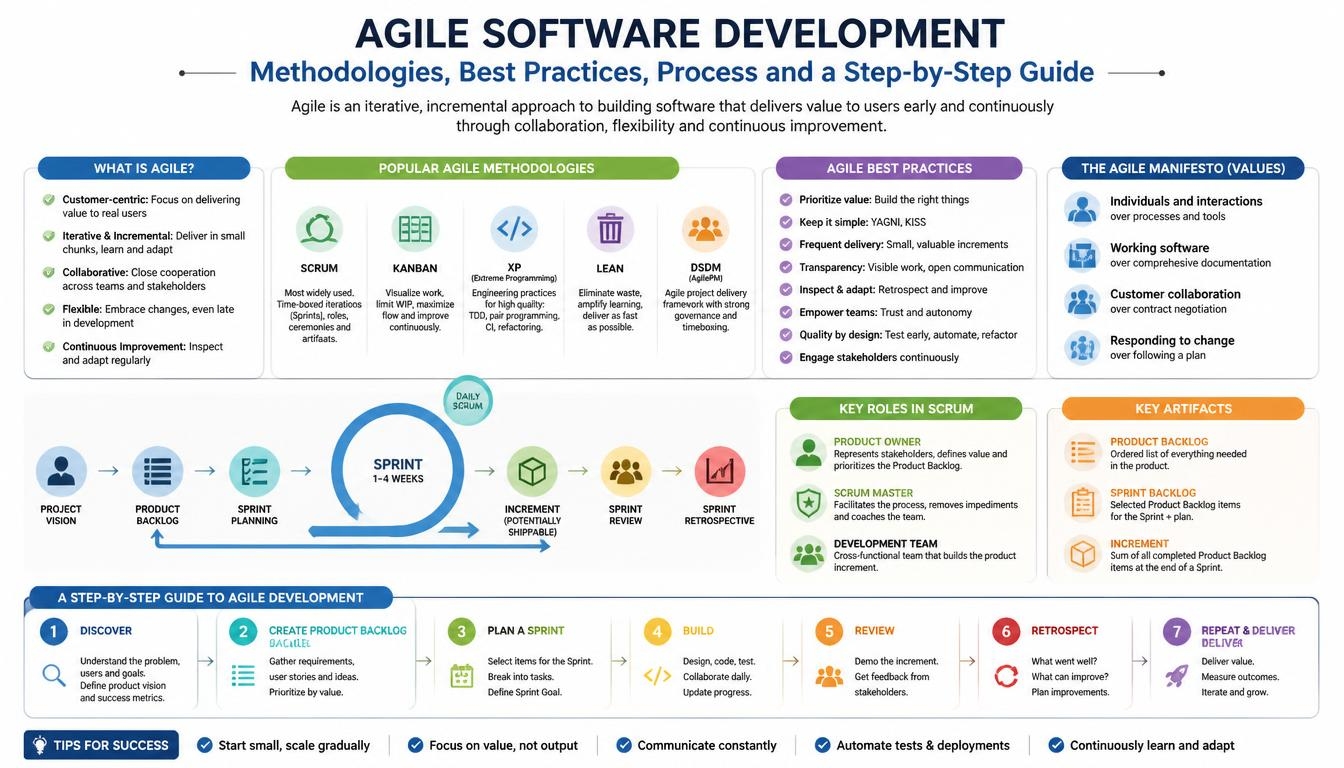
1. What Is Agile Software Development?
Agile software development is an approach to building software through short development cycles, continuous feedback and incremental delivery.
Rather than trying to define every requirement at the beginning and deliver the complete product at the end, an Agile team breaks the project into smaller pieces of work.
Each development cycle focuses on a manageable set of requirements. The team designs, develops and tests those features, demonstrates the working result and collects feedback before deciding what to improve or build next.
For example, imagine a business wants to develop a custom logistics management platform.
A traditional approach might plan the entire system, including shipment booking, fleet management, tracking, warehouse management, billing and reporting, before the complete application is delivered.
An Agile approach could deliver the platform in stages:
- First iteration: User registration, authentication and customer management.
- Second iteration: Shipment booking and shipment records.
- Third iteration: Fleet and driver management.
- Fourth iteration: Shipment tracking and notifications.
- Fifth iteration: Billing, reporting and additional automation.
The customer can review working functionality throughout development instead of waiting until the entire system is complete.
This makes it easier to identify missing requirements, correct misunderstandings and adjust priorities.
2. Core Principles of Agile Development
The Agile movement was established around the Manifesto for Agile Software Development, published in 2001 by 17 software practitioners.
The manifesto introduced four core values:
- Individuals and interactions over processes and tools: Communication and collaboration are more important than blindly following a process.
- Working software over comprehensive documentation: Useful, functioning software is the primary measure of progress, while appropriate documentation remains important.
- Customer collaboration over contract negotiation: Developers and customers should work together throughout the project.
- Responding to change over following a plan: A project should be able to adapt when requirements or business priorities change.
These values do not mean that planning, documentation, contracts or tools are unnecessary. They mean that these things should support successful software delivery rather than become the main objective.
In practical development, Agile encourages teams to:
- Deliver useful functionality early and regularly.
- Collect customer feedback throughout the project.
- Welcome reasonable changes in requirements.
- Maintain a sustainable development pace.
- Focus on software quality and good technical design.
- Review processes and improve them regularly.
The central idea is straightforward: build useful software, validate it with real feedback and keep improving it.
3. Popular Agile Software Development Methodologies
Agile is not a single methodology. It is a broader approach supported by several frameworks and methods.
The right choice depends on the type of project, team size, business requirements, release expectations and level of uncertainty.
3.1 Scrum
Scrum is one of the most widely used frameworks for managing complex product development.
It organizes work into fixed-length iterations called Sprints. A Sprint is typically one month or less, and many software teams use two-week Sprints.
Scrum defines three accountabilities:
- Product Owner: Responsible for maximizing product value and managing Product Backlog priorities.
- Scrum Master: Helps establish Scrum effectively and supports the team in improving its way of working.
- Developers: The people who create the usable product increment during each Sprint.
Scrum includes five formal events:
- Sprint Planning
- Daily Scrum
- Sprint Review
- Sprint Retrospective
- The Sprint itself, which contains the other events.
It also defines three artifacts:
- Product Backlog
- Sprint Backlog
- Increment
Each artifact has a corresponding commitment: Product Goal, Sprint Goal and Definition of Done.
Example: A team developing a SaaS application may use two-week Sprints. During one Sprint, it may complete user registration and authentication. In the next, it may develop subscription management and payment integration.
Scrum is useful when a project has evolving requirements, a product team needs regular feedback and work can be organized around clear Sprint Goals.
3.2 Kanban
Kanban focuses on visualizing work, managing the flow of tasks and limiting work in progress.
Instead of requiring fixed-length Sprints, a Kanban team continuously pulls work into its workflow when capacity is available.
A typical Kanban board may contain:
| Backlog | To Do | In Progress | Testing | Done |
|---|---|---|---|---|
| New requirements | Ready tasks | Active development | QA review | Completed work |
Each task moves through the workflow as work progresses.
Common Kanban practices include:
- Visualizing the complete workflow.
- Limiting work in progress (WIP).
- Managing the flow of work.
- Making workflow policies explicit.
- Regularly reviewing and improving the process.
For example, a software maintenance team handling bugs, feature requests and support tasks may benefit from Kanban because work arrives continuously and priorities can change frequently.
Kanban is particularly useful for maintenance projects, support teams, ongoing product improvements and teams that need flexible task management.
3.3 Extreme Programming (XP)
Extreme Programming, commonly known as XP, is an Agile software development method that places strong emphasis on engineering practices and code quality.
While Scrum and Kanban primarily help organize and manage work, XP provides practices that improve how software is actually developed.
Important XP practices include:
- Test-Driven Development (TDD)
- Pair programming
- Continuous integration
- Frequent small releases
- Refactoring
- Simple design
- Collective code ownership
- Regular customer feedback
For example, developers may write automated tests before implementing a feature, integrate their changes frequently and refactor the code to keep the application maintainable.
XP is especially useful when requirements change frequently and the software requires a strong engineering discipline.
3.4 Lean Software Development
Lean software development focuses on maximizing customer value while reducing unnecessary work and delays.
Its ideas include:
- Eliminating activities that do not add value.
- Building quality into the development process.
- Delivering quickly.
- Making decisions at the appropriate level.
- Optimizing the overall workflow.
- Continuously improving the process.
For example, a team may reduce unnecessary approval steps, avoid developing features that customers do not need and prioritize the functionality that solves the most important business problems.
3.5 Hybrid Agile Approach
Not every organization needs to follow one framework exactly.
Some projects benefit from combining practices from different approaches.
For example:
- Scrum for planning and managing development iterations.
- Kanban boards for visualizing work and managing urgent tasks.
- XP practices for automated testing and code quality.
- Lean principles for reducing waste and prioritizing customer value.
A hybrid approach can be practical when a business has both planned feature development and ongoing support requirements.
Which Agile methodology should you choose?
| Methodology | Best suited for | Main focus |
|---|---|---|
| Scrum | Product and application development | Sprint-based delivery |
| Kanban | Maintenance and continuous work | Workflow and task flow |
| XP | Engineering-intensive development | Code quality and testing |
| Lean | Process improvement | Customer value and waste reduction |
| Hybrid Agile | Projects with mixed requirements | Flexible combination of practices |
There is no universally best methodology. The best approach is the one that helps the team deliver reliable software and respond to real business needs.
4. Agile Software Development Process: Step by Step
Understanding the Agile methodology is useful, but businesses also need to know how it works in an actual software project.
The following steps describe a practical Agile development lifecycle, from initial discussions through deployment and continuous improvement.
Step 1: Requirement Gathering and Business Understanding
Every successful software project starts with understanding the business problem.
Before development begins, the team should identify what the business wants to achieve, who will use the application and which problems the software needs to solve.
Activities may include:
- Understanding business objectives.
- Identifying target users.
- Discussing existing business workflows.
- Identifying functional requirements.
- Understanding integrations and technical constraints.
- Identifying security and performance expectations.
- Defining project priorities.
For example, if a company wants to develop a customer management application, the initial discussion may identify customer registration, contact management, lead tracking, reporting and role-based access as important requirements.
The output of this stage should be a shared understanding of the product’s purpose, scope and priorities.
Step 2: Define the Product Vision and MVP
The next step is to define what the first useful version of the application should contain.
This is where the concept of a Minimum Viable Product (MVP) becomes important.
An MVP is an initial version containing enough functionality to solve a core problem and collect meaningful feedback.
It does not mean delivering an incomplete or unreliable application. Essential functionality, security and quality standards must still be maintained.
For example, an e-commerce application may initially include:
- Customer registration and login.
- Product catalogue.
- Product details.
- Shopping cart.
- Checkout and payment integration.
- Order management.
Advanced recommendation engines, loyalty programs and complex analytics can be introduced in later iterations if they are not essential to the first release.
Defining an MVP helps businesses prioritize development and avoid spending time on features that may not be needed immediately.
Step 3: Create and Prioritize the Product Backlog
Once the product vision is clear, requirements are organized into a Product Backlog.
A Product Backlog is an ordered list of product improvements, features, fixes and other work needed to develop the application.
Items are commonly written as user stories.
A typical user story follows this format:
“As a [type of user], I want [a capability], so that [a benefit].”
For example:
“As a customer, I want to track my shipment online so that I can check its delivery status without contacting customer support.”
Each user story should have clear acceptance criteria explaining what must happen for the requirement to be considered complete.
Backlog items can be prioritized using factors such as:
- Business value.
- Customer importance.
- Technical dependencies.
- Development effort.
- Security and compliance requirements.
- Operational risks.
Prioritization helps the team focus on the most valuable work first.
Step 4: UI/UX Design and Technical Planning
Before implementing a feature, the team should understand how users will interact with it and how it fits into the application’s architecture.
This stage may include:
- User journey mapping.
- Wireframes and interface designs.
- Database planning.
- API design.
- Authentication and authorization planning.
- Third-party integration planning.
- Technology selection.
- Performance and security considerations.
Design and technical planning should be sufficient to reduce major risks without attempting to predict every future requirement.
For example, a customer dashboard may be designed and reviewed before development begins. Developers can then implement it in smaller parts, collecting feedback as the application evolves.
Step 5: Sprint Planning and Task Allocation
In Scrum, the team holds Sprint Planning before starting a new Sprint.
The team discusses:
- Why the Sprint is valuable.
- Which Product Backlog items can be completed.
- How the selected work will be delivered.
- What the Sprint Goal should be.
Selected user stories are broken into smaller development tasks.
For example, a shipment booking feature may require:
- Frontend booking form.
- Backend booking API.
- Database tables and relationships.
- Input validation.
- Customer notification.
- Automated tests.
The team should select work based on actual capacity and a realistic understanding of complexity.
A Sprint commitment should focus on a meaningful goal, not simply the number of tasks assigned to individual developers.
Step 6: Development and Code Implementation
Once the Sprint begins, developers work on the selected tasks.
Good Agile development practices include:
- Small, focused code changes.
- Version control using Git.
- Clear development standards.
- Peer code reviews.
- Reusable and maintainable components.
- API and database validation.
- Automated testing.
- Frequent code integration.
Developers should avoid keeping large changes isolated for long periods because this increases integration risks.
Each completed feature should be integrated and tested as part of the application.
Step 7: Continuous Testing and Quality Assurance
Testing should happen throughout development rather than being postponed until the end of the project.
Depending on the application, the testing process may include:
Unit testing: Checks individual functions or components.
Integration testing: Verifies that different services and modules work together.
API testing: Validates backend endpoints, request handling and responses.
UI testing: Checks the user interface and important interactions.
End-to-end testing: Validates complete user workflows.
Security testing: Identifies vulnerabilities and access-control problems.
Performance testing: Checks how the application behaves under expected workloads.
For example, an e-commerce checkout should be tested across the complete workflow: cart calculation, address validation, payment processing, order creation and confirmation.
Automated tests should run regularly through a Continuous Integration (CI) pipeline so that defects can be identified early.
Step 8: Sprint Review and Customer Feedback
At the end of a Sprint, the team demonstrates the completed product increment to stakeholders.
This is an opportunity to review working functionality rather than relying only on written progress reports.
Customers can provide feedback about:
- Whether the feature meets the requirement.
- Whether the user experience is clear.
- Whether additional functionality is needed.
- Whether business priorities have changed.
- Whether the feature is ready for wider release.
Feedback is then considered during Product Backlog refinement and future planning.
A Sprint Review is not simply a formal presentation. Its purpose is to inspect the product and discuss what should happen next.
Step 9: Sprint Retrospective and Process Improvement
After reviewing the product, the team reflects on how the work was completed.
The retrospective helps identify what is working well and what needs improvement.
The team may discuss:
- Communication problems.
- Delayed approvals.
- Development bottlenecks.
- Testing issues.
- Unclear requirements.
- Technical debt.
- Opportunities to improve collaboration.
The team should agree on practical improvement actions and review whether they make a difference in subsequent Sprints.
Step 10: Deployment and Continuous Improvement
Once functionality has passed the required quality checks and release approvals, it can be deployed to the production environment.
A modern release process may include:
- Automated build and deployment pipelines.
- Staging environment validation.
- Database migration checks.
- Backup and rollback planning.
- Production monitoring.
- Error tracking.
- User feedback collection.
Agile does not require every Sprint to result in an immediate production release. The release schedule depends on business needs, risk, testing requirements and deployment readiness.
After launch, the team continues to monitor the application, fix issues, improve performance and add features based on customer feedback.
5. Agile Software Development Best Practices
Agile works best when teams follow practical development and collaboration standards.
Using a project board or scheduling daily meetings alone will not produce the expected results. The following practices help make Agile more effective.
5.1 Keep Requirements Clear and Testable
Every development task should explain what needs to be built and why it matters.
Avoid vague requirements such as “improve the dashboard.”
Instead, define the expected behaviour, relevant user roles and acceptance criteria.
Clear requirements reduce misunderstandings and unnecessary rework.
5.2 Break Large Features into Smaller Tasks
Large features should be divided into manageable pieces that can be developed, reviewed and tested independently.
Smaller work items make progress easier to understand and reduce the risk of late integration problems.
5.3 Maintain Regular Customer Communication
Customers should be involved throughout the development process.
Regular demonstrations, discussions and feedback sessions help ensure that the application continues to match business expectations.
For distributed teams, scheduled calls, shared project boards and written decisions can provide transparency across time zones.
5.4 Use Version Control and Code Reviews
Every development team should use a consistent version control workflow.
A practical approach includes:
- Git-based version control.
- Short-lived feature branches.
- Pull requests.
- Peer code reviews.
- Automated checks before merging.
- A protected main branch.
Code reviews help identify defects, improve maintainability and share technical knowledge across the team.
5.5 Automate Testing and Continuous Integration
Manual testing remains useful, but repetitive checks should be automated wherever practical.
A CI pipeline can automatically build the application, run tests and check code quality when changes are submitted.
This helps developers identify problems before changes reach the main codebase.
5.6 Define a Clear Definition of Done
A task should not be marked complete merely because the code has been written.
A practical Definition of Done may require:
- Implementation completed.
- Acceptance criteria satisfied.
- Required tests passing.
- Code review approved.
- Security and quality checks completed.
- Documentation updated where necessary.
- Changes integrated successfully.
- Release requirements satisfied.
This prevents partially implemented work from being treated as finished.
5.7 Manage Technical Debt
Agile teams should not focus only on new features.
Refactoring, performance improvements, security updates and maintenance work should also be included in the backlog.
Ignoring technical debt can make future development slower and more expensive.
5.8 Measure Progress Using Useful Metrics
Agile teams need meaningful measurements, but metrics should help improve the process rather than create unnecessary pressure.
Useful metrics include:
- Cycle time: How long work takes from starting to completion.
- Lead time: How long it takes from a request being made to delivery.
- Throughput: How many work items are completed during a period.
- Defect rate: The number and severity of defects identified.
- Change failure rate: The proportion of production changes that cause failures or require corrective action.
- Customer outcomes: Whether delivered functionality solves the intended business problem.
Velocity can help a Scrum team understand its own historical Sprint capacity, but it should not be used to compare individual developers or different teams.
5.9 Keep the Process Simple
Agile should improve delivery, not create unnecessary meetings and administrative work.
Every meeting, report and approval step should have a clear purpose.
Teams should review their process regularly and remove activities that do not contribute to better software or better collaboration.
6. Common Agile Software Development Mistakes to Avoid
Agile adoption can fail when organizations follow the visible activities without understanding the underlying principles.
Some common mistakes include:
Treating Agile as a faster version of traditional development: Agile is not simply about working faster. It is about delivering value incrementally and learning through feedback.
Changing requirements without prioritization: Agile welcomes change, but every change still needs to be evaluated for business value, effort, dependencies and impact.
Skipping documentation: Agile values working software, but architecture decisions, API contracts, deployment instructions and important business rules still need appropriate documentation.
Holding meetings without clear outcomes: Daily discussions should help the team coordinate work and identify blockers, not become lengthy status-reporting sessions.
Ignoring testing: Frequent releases without proper testing can increase defects and reduce customer confidence.
Overloading developers: Assigning more work than a team can realistically complete leads to unfinished tasks, poor quality and unpredictable delivery.
Using Agile terminology without changing the process: Calling a meeting a Sprint Planning session does not make a project Agile if requirements, feedback and development remain disconnected.
A successful Agile process requires discipline, transparency and continuous improvement.
7. Which Tools Help Manage Agile Software Projects?
Agile teams often use project management and development tools to organize work and maintain visibility.
Some widely used options include:
| Tool | Common use |
|---|---|
| Jira | Backlog management, Scrum boards and Kanban workflows |
| Trello | Visual task and Kanban management |
| Azure DevOps | Work tracking, repositories and CI/CD |
| GitHub | Source control, pull requests and project tracking |
| GitLab | Source control, issue tracking and CI/CD |
| Linear | Product planning and software issue tracking |
| Confluence | Project documentation and knowledge sharing |
The choice depends on the team’s size, existing development environment, reporting needs and budget.
A tool should support the team’s working process. It should not dictate unnecessary complexity.
8. How Xenixsoft Helps Businesses Follow Agile Software Development Step by Step
Choosing Agile is only the beginning. Businesses also need a development partner that can translate requirements into a structured delivery process and maintain communication throughout development.
At Xenixsoft, we can support businesses through the following practical stages of an Agile software project.
Step 1: Understand Your Business and Project Requirements
We begin by understanding the business objective, target users, existing workflows and the problems the application should solve.
During this stage, we discuss:
- What the software needs to achieve.
- Who will use the application.
- Which features are essential.
- What integrations are required.
- Which technical or operational constraints exist.
- What the initial delivery should include.
Our output: A clear project understanding, initial requirements and agreed priorities.
Step 2: Define the Project Scope and MVP
Once the requirements are understood, we help identify the most important features for the first version.
Rather than attempting to build every possible feature immediately, we organize the scope around business value and implementation priorities.
For example, a SaaS business application may begin with user registration, role-based access, the main business workflow and an administrative dashboard.
Advanced automation and reporting can be planned for later releases.
Our output: An agreed MVP scope and an initial development roadmap.
Step 3: Prepare the Product Backlog and Development Plan
We organize the requirements into smaller features, user stories and development tasks.
Each important item should include its expected behaviour and acceptance criteria.
We then identify dependencies, estimate effort and prioritize the work.
Depending on the project, we can organize development through Scrum Sprints, a Kanban workflow or a suitable combination of both.
Our output: A prioritized backlog, task structure and initial Sprint or delivery plan.
Step 4: Design the User Experience and Application Architecture
Before development, we plan how the application should work from both the user’s and the technical perspectives.
This can include:
- Wireframes and UI/UX design.
- Database structure.
- API architecture.
- Frontend and backend responsibilities.
- Authentication and permissions.
- Third-party integrations.
- Security and scalability requirements.
The architecture is planned around the actual product requirements rather than adding unnecessary complexity.
Our output: Reviewed designs and an agreed technical implementation plan.
Step 5: Develop the Application in Manageable Iterations
Our development team works on prioritized features in small, reviewable increments.
Depending on the project, this can include frontend development, backend services, database implementation, API integrations and application functionality.
We use version control, structured code changes and development reviews to maintain consistency.
Progress is shared through the agreed project management and communication process.
Our output: Working application features delivered incrementally.
Step 6: Test Every Important Feature
Testing is integrated into the development process rather than postponed until the project is nearly complete.
We validate functionality, user workflows, API responses, database operations and important integrations.
Automated testing can be introduced where suitable, along with manual quality assurance and regression testing.
Our output: Tested functionality with identified issues addressed before release.
Step 7: Demonstrate Progress and Collect Feedback
At agreed intervals, we share completed functionality with the client.
This allows stakeholders to review actual application behaviour and provide feedback.
If a requirement needs to change, we assess its impact and update the backlog and priorities accordingly.
Our output: Reviewed development increments and an updated list of priorities.
Step 8: Prepare and Deploy the Application
When the agreed release scope is ready, we prepare the application for deployment.
This may include:
- Production environment configuration.
- Database migration.
- Deployment pipeline setup.
- Security and configuration checks.
- Backup planning.
- Final testing.
- Release coordination.
The deployment process depends on the client’s infrastructure and operational requirements.
Our output: A tested release deployed to the agreed production environment.
Step 9: Maintain, Monitor and Improve
Software development does not end with the first release.
After deployment, we can continue supporting the application through maintenance, bug fixes, performance improvements, security updates and new feature development.
Customer feedback and actual application usage help determine what should be improved next.
Our output: Ongoing technical support and a prioritized roadmap for future improvements.
What Businesses Can Expect from an Agile Development Partnership
Working with a development partner using an Agile approach can provide:
- Better visibility into development progress.
- Regular opportunities to review working functionality.
- Clearer communication about priorities and changes.
- Earlier identification of technical issues.
- More manageable feature delivery.
- A structured process for testing and quality assurance.
- Flexibility to improve the product as business needs evolve.
The exact delivery schedule, communication frequency and project structure should be agreed before development begins.
9. When Should a Business Choose Agile Development?
Agile can be particularly useful when:
- Developing a new SaaS product.
- Building a custom web or mobile application.
- Creating an enterprise business management system.
- Developing an e-commerce platform with evolving requirements.
- Integrating multiple third-party services.
- Modernizing an existing application.
- Building an application that requires regular customer feedback.
- Managing long-term product development and maintenance.
However, Agile is not automatically the best fit for every project.
Projects with fixed regulatory requirements, strict contractual milestones or highly predictable deliverables may need additional upfront planning and formal approval processes.
A hybrid approach can help balance structured governance with iterative software delivery.
Conclusion
Agile software development provides a practical way to build software through incremental delivery, regular feedback and continuous improvement.
Frameworks such as Scrum and Kanban help teams organize and manage work, while engineering practices from Extreme Programming improve code quality and reduce development risks.
But the real value of Agile comes from how it is applied. Clear requirements, realistic planning, customer collaboration, continuous testing and a reliable deployment process are all essential.
For businesses planning a new application or improving an existing product, an experienced development partner can help turn these principles into a structured and transparent delivery process.
At Xenixsoft, we help businesses plan, design, develop, test and improve custom software applications through an approach that keeps business priorities and software quality at the center of development.
The objective is not simply to complete development tasks. It is to build software that solves real problems and continues to evolve with the business.