
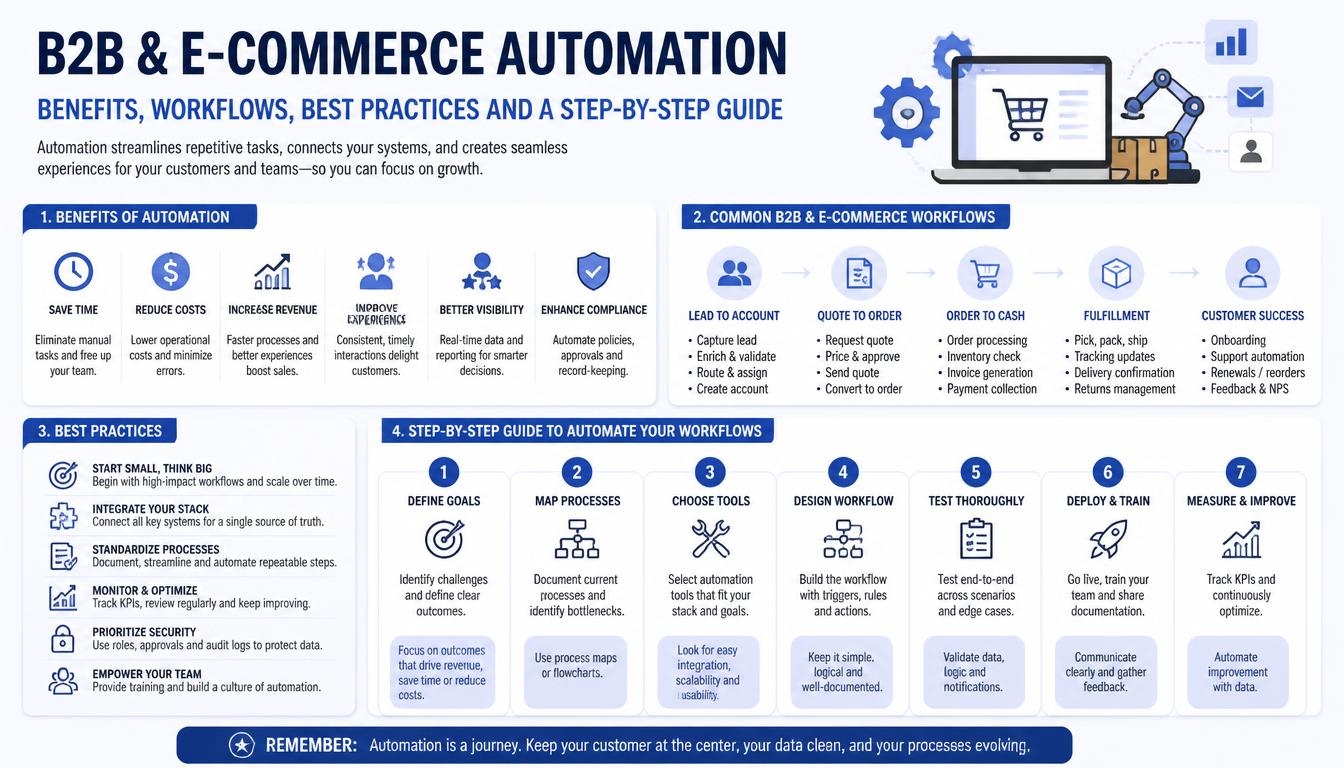
1. What Is B2B and E-commerce Automation?
B2B and e-commerce automation refers to using software, integrations, business rules and AI-powered services to manage repetitive commercial and operational processes with less manual intervention.
It connects different parts of a business so that information can move between systems and trigger the next action automatically.
For example, a typical online order may involve several departments:
- A customer selects products and submits an order.
- The e-commerce platform validates the order.
- Customer-specific pricing and discounts are applied.
- Inventory availability is checked.
- The order is synchronized with the ERP or order management system.
- The warehouse receives fulfilment instructions.
- An invoice is generated according to the business rules.
- The customer receives order and shipping updates.
Without automation, employees may need to perform many of these steps manually.
With a properly integrated platform, most routine steps can happen automatically, while exceptions and sensitive decisions are sent to the appropriate employee for review.
Understanding B2B vs B2C E-commerce Automation
B2B and B2C e-commerce share some common processes, but their business requirements can be very different.
| Area | B2B E-commerce | B2C E-commerce |
|---|---|---|
| Customers | Businesses and organizations | Individual consumers |
| Pricing | Contract, account-specific and volume pricing | Usually public retail pricing |
| Orders | Bulk and recurring orders | Usually individual purchases |
| Payments | Purchase orders, credit terms and invoices | Cards and digital payments |
| Approvals | Multiple buyers and approval workflows | Usually individual checkout |
| Customer accounts | Companies with multiple users and roles | Individual customer accounts |
| Sales process | Often longer and relationship-driven | Usually shorter |
| Reordering | Frequently recurring | Depends on the product |
B2B automation must account for customer account hierarchies, negotiated pricing, approval requirements, purchase orders and longer commercial relationships.
B2C automation often places more emphasis on checkout conversion, customer experience, promotions, fulfilment and post-purchase communication.
A business operating both models may need a platform that supports different workflows for each customer type.
2. Why Do Businesses Need B2B and E-commerce Automation?
As online sales and business operations grow, manual processes become increasingly difficult to manage.
Some common challenges include:
2.1 Manual Order Processing
Employees may receive orders through email, phone calls, spreadsheets or an online store and then manually enter them into an ERP or accounting application.
This increases processing time and creates opportunities for data-entry mistakes.
2.2 Inventory Mismatch
When inventory information is not synchronized between the online store and warehouse or ERP system, customers may see products as available even when stock is limited or unavailable.
This can result in overselling, cancelled orders and customer dissatisfaction.
2.3 Complex B2B Pricing
Business customers may have different price lists, volume discounts, negotiated rates, minimum order quantities and payment terms.
Managing these rules manually becomes difficult as the number of customers and products increases.
2.4 Disconnected Business Applications
Many businesses use separate applications for e-commerce, CRM, ERP, accounting, inventory and shipping.
If these applications do not communicate properly, employees must repeatedly transfer information between systems.
2.5 Delayed Customer Communication
Customers expect order confirmations, shipping updates, invoice information and responses to enquiries.
Manual communication can create delays, especially when order volumes increase.
2.6 Limited Business Visibility
When information is spread across different applications, management may struggle to understand sales performance, inventory levels, outstanding payments and fulfilment issues.
Automation helps connect these processes and creates a more consistent view of business operations.
3. Essential B2B and E-commerce Automation Workflows
A successful automation strategy should focus on the processes that consume the most time, create repeated errors or directly affect customer experience.
The following workflows are common priorities.
3.1 Customer Registration and Account Approval
B2B businesses often need to verify new business customers before allowing them to access wholesale pricing or place orders.
An automated onboarding workflow can:
- Collect company and contact information.
- Capture tax or business registration details where required.
- Verify submitted information.
- Assign the customer to an account category.
- Route applications for approval.
- Create the customer account in the relevant business systems.
- Assign pricing and payment terms.
- Notify the customer when access is approved.
For example, a wholesale distributor may allow registered retailers to apply for a trade account. After verification, the system can assign the appropriate customer group and display the relevant product pricing.
Sensitive account approvals should remain subject to the business’s verification rules.
3.2 Product Catalogue and Inventory Synchronization
Product information may be maintained in an ERP, Product Information Management (PIM) system or e-commerce platform.
Automation can synchronize:
- Product names and descriptions.
- SKU and product identifiers.
- Product categories.
- Product images.
- Product variations.
- Stock availability.
- Warehouse locations.
- Product status.
Inventory synchronization is particularly important because outdated stock information can lead to failed orders.
For example, when a warehouse records a stock reduction, the updated availability can be sent to the e-commerce platform so customers see a more accurate inventory position.
3.3 Automated B2B Pricing and Discount Management
B2B pricing can be more complex than standard retail pricing.
A business may offer different prices to distributors, wholesalers, retailers and long-term customers.
An automated pricing engine can support:
- Customer-specific price lists.
- Bulk quantity discounts.
- Contract pricing.
- Minimum order quantities.
- Promotional discounts.
- Regional pricing.
- Currency-specific pricing.
- Customer-specific payment terms.
For example, Customer A may receive a negotiated price for a product, while Customer B receives a different price based on an annual purchasing agreement.
The platform should apply the correct pricing rules when the customer logs in and creates an order.
3.4 Automated Order Processing
Order processing is one of the most valuable areas for automation.
A typical workflow can include:
- Customer submits an order.
- System validates customer and order information.
- Pricing and discount rules are applied.
- Inventory availability is checked.
- Payment or credit conditions are validated.
- Order is created in the ERP or order management system.
- Warehouse receives the fulfilment request.
- Customer receives confirmation.
Additional rules can handle backorders, partial fulfilment, order changes and exceptions.
For businesses receiving orders through multiple channels, the system can centralize order information so employees do not need to manage each channel independently.
3.5 Automated Quote Generation
Many B2B transactions begin with a quotation rather than an immediate online purchase.
A quote automation system can help sales teams generate quotations using:
- Product selection.
- Customer-specific pricing.
- Quantity and volume discounts.
- Delivery charges.
- Taxes.
- Contract terms.
- Quote expiry dates.
The customer can review the quotation and approve it through a secure portal.
After approval, the quotation can be converted into a sales order, subject to the relevant business rules.
This can reduce manual quotation preparation and improve the consistency of sales operations.
3.6 Invoice and Payment Automation
Financial workflows can also be connected with order processing.
Automation may include:
- Invoice generation.
- Tax calculations.
- Payment confirmation.
- Outstanding payment reminders.
- Credit limit validation.
- Payment status synchronization.
- Refund and credit-note workflows.
- Accounting system updates.
For B2B customers with approved credit terms, the system can create invoices according to the agreed billing conditions rather than requiring immediate online payment.
Financial actions should be validated carefully, with appropriate approval controls and audit records.
3.7 Shipping and Fulfilment Automation
Once an order is ready for dispatch, the system can coordinate warehouse and shipping activities.
Possible workflows include:
- Warehouse picking instructions.
- Packing status updates.
- Shipping label generation.
- Carrier selection.
- Tracking number registration.
- Dispatch notifications.
- Delivery status synchronization.
- Proof-of-delivery collection.
When the carrier updates shipment information, the e-commerce portal can display the latest available tracking status.
3.8 Automated Returns and Refunds
Returns are another important part of e-commerce operations.
An automated return management workflow can allow customers to:
- Submit a return request.
- Select the reason for return.
- Upload supporting photographs.
- Check return eligibility.
- Receive return instructions.
- Track return progress.
- Receive refund or replacement updates.
The system can apply different return rules based on product category, order status and business policy.
Some cases may require manual inspection or approval before a refund is issued.
4. How AI Is Transforming B2B and E-commerce Automation
Traditional automation follows predefined business rules. Artificial intelligence adds capabilities such as language understanding, classification, prediction and decision support.
AI should not replace every business rule. It is most useful when information is unstructured, patterns need to be identified or customers require more flexible interactions.
4.1 AI-Powered Customer Support
An AI assistant can answer common questions about:
- Product specifications.
- Order status.
- Shipping information.
- Return policies.
- Account information.
- Product availability.
It can also collect customer requirements and route complex enquiries to the relevant employee.
For B2B businesses, the assistant can help customers find products and understand ordering procedures using information from approved company data sources.
4.2 Intelligent Product Recommendations
AI can analyze customer activity, purchase history, product relationships and browsing behaviour to recommend relevant products.
For example, a wholesale customer who regularly purchases a particular product may receive recommendations for compatible accessories or related items.
Recommendations should respect customer permissions, account-specific catalogues and pricing rules.
4.3 Automated Purchase Order Processing
Businesses often receive purchase orders as PDF documents, scanned files or email attachments.
AI-powered document processing can extract:
- Customer details.
- Purchase order number.
- Product SKUs.
- Quantities.
- Agreed prices.
- Delivery addresses.
- Requested delivery dates.
The extracted information can be matched against product and customer records.
Before creating an order, the system should validate the extracted data and request human review when important information is missing or inconsistent.
4.4 AI-Assisted Sales and Lead Management
AI can help sales teams classify enquiries, summarize customer interactions and identify potential follow-up actions.
It can also support:
- Lead categorization.
- Customer segmentation.
- Enquiry summaries.
- Follow-up recommendations.
- Sales opportunity analysis.
- Customer activity reporting.
This allows sales teams to spend more time on customer relationships instead of repetitive administrative work.
4.5 Demand Forecasting and Inventory Planning
Machine learning can analyze historical sales, seasonal patterns, stock movements and purchasing behaviour to estimate future demand.
These insights can help businesses:
- Identify products that may require replenishment.
- Plan inventory levels.
- Recognize seasonal demand patterns.
- Reduce excess stock.
- Prepare for changes in order volumes.
Forecasts should be treated as estimates and combined with business knowledge before purchasing decisions are made.
4.6 AI-Powered Search and Product Discovery
Large B2B catalogues can contain thousands of products with technical specifications, variations and industry-specific terminology.
AI-powered search can help customers find products using natural language.
For example, a customer could search:
“I need an industrial pump suitable for high-temperature water applications.”
The search system can identify relevant product attributes and present matching products.
The final results should be grounded in actual product specifications rather than AI-generated assumptions.
4.7 AI-Assisted Pricing and Quotation
AI can help analyze historical quotation data, product costs, customer purchasing patterns and sales trends.
It may recommend pricing adjustments or identify unusual quote requests.
However, negotiated prices, contract terms, tax calculations and final commercial approvals should remain controlled by explicit business rules and authorized employees.
5. Technology Stack for B2B and E-commerce Automation
The technology stack depends on the business model, order volume, existing systems and integration requirements.
For custom automation platforms, the following technologies provide a modern and flexible foundation.
5.1 Frontend Development
Recommended technologies: React, Next.js and TypeScript
These technologies can be used to develop:
- B2B customer portals.
- E-commerce storefronts.
- Product catalogues.
- Customer dashboards.
- Order management interfaces.
- Admin panels.
- Sales and reporting dashboards.
TypeScript helps maintain consistency in larger applications, while Next.js supports flexible application development and rendering strategies.
5.2 Backend Development
Recommended technologies: Node.js and NestJS
The backend manages business logic and coordinates communication between the e-commerce platform and connected systems.
It can handle:
- Customer accounts.
- Product and pricing rules.
- Order processing.
- Payment workflows.
- Inventory synchronization.
- Notifications.
- API integrations.
- Workflow execution.
A modular backend can keep different business functions organized while allowing the platform to evolve.
5.3 Database and Data Management
Recommended technologies: PostgreSQL and Redis
PostgreSQL can store structured business information such as customers, orders, products, transactions and pricing rules.
Redis can support caching, temporary data storage and background processing.
For larger catalogues and advanced product discovery, a dedicated search engine may also be appropriate.
5.4 Workflow Automation and Integration
Recommended technologies: APIs, webhooks, message queues and integration services
Automation depends on reliable communication between applications.
For example:
- An order event can trigger ERP synchronization.
- An inventory update can refresh product availability.
- A payment confirmation can trigger invoice processing.
- A shipment event can notify the customer.
Tools such as n8n, Make or Zapier may be suitable for selected low-code integrations. More complex or business-critical workflows may require custom integration services.
5.5 AI and Machine Learning
Recommended technologies: Python, FastAPI and AI model APIs
Python-based services can support:
- Document extraction.
- Product classification.
- Demand forecasting.
- Recommendation engines.
- Intelligent search.
- AI assistants.
- Data analysis.
FastAPI can expose these capabilities through APIs that communicate with the main application.
AI services should be connected to approved business data and should respect access permissions.
5.6 Cloud Infrastructure
Recommended platform: AWS
Cloud infrastructure can support:
- Application hosting.
- Database services.
- Document storage.
- Background processing.
- Monitoring and logging.
- Automated backups.
- Secure API access.
Docker and CI/CD pipelines can help standardize deployment and application updates.
The infrastructure should be selected according to actual traffic, reliability requirements and budget rather than introducing unnecessary complexity at the beginning.
6. B2B and E-commerce Automation Architecture
A connected automation platform usually involves multiple systems working together.
A simplified architecture may look like this:
Customer-facing layer
- B2B portal.
- E-commerce storefront.
- Customer account dashboard.
- Mobile interfaces.
Application layer
- Customer management.
- Product catalogue.
- Pricing engine.
- Order management.
- Payment workflows.
- Returns and fulfilment.
Integration layer
- API gateway.
- ERP connectors.
- CRM connectors.
- Webhooks.
- Background workers.
- Event processing.
Business systems
- ERP.
- CRM.
- Accounting software.
- Warehouse management system.
- Payment gateway.
- Shipping and carrier services.
AI and analytics layer
- Document processing.
- AI customer support.
- Product recommendations.
- Demand forecasting.
- Business reporting.
The integration layer is particularly important. It ensures that information moves between systems in a controlled and reliable way.
Why System Integration Matters
A business may already have an ERP, CRM, accounting application and e-commerce platform.
Replacing all these systems may be unnecessary.
In many cases, the better approach is to connect the existing systems through APIs, webhooks and carefully designed integration services.
For example:
- The ERP may own inventory and financial records.
- The e-commerce platform may own online cart and checkout activity.
- The CRM may own sales interactions and customer relationship information.
- The accounting application may own accounting and reconciliation records.
The business should clearly define which system is authoritative for each type of information.
This avoids conflicts when the same record is updated in multiple applications.
7. Best Practices for B2B and E-commerce Automation
Automation can create new problems if workflows are poorly designed.
The following practices help businesses build more reliable systems.
7.1 Start with Business Processes, Not Tools
Before choosing automation software, identify which business activities need improvement.
For example, if employees spend several hours entering orders into the ERP, order synchronization may be a better first priority than an AI chatbot.
7.2 Define a Source of Truth for Business Data
Decide which application owns important records such as customer information, product details, inventory, pricing and financial transactions.
Avoid allowing different systems to overwrite one another without clear rules.
7.3 Use Real-Time Synchronization Where It Matters
Some information needs immediate updates.
For example, inventory availability and order status may need frequent or event-driven synchronization.
Other information, such as historical reports or accounting summaries, may be synchronized in scheduled batches.
The synchronization method should reflect the business impact of delayed data.
7.4 Handle Failed Integrations Properly
External APIs can fail, systems can become temporarily unavailable and network connections can be interrupted.
A reliable integration should support:
- Retry mechanisms.
- Error logging.
- Duplicate prevention.
- Idempotent processing.
- Failed-event queues.
- Monitoring and alerts.
- Reconciliation procedures.
For example, retrying an order synchronization should not accidentally create the same order twice.
7.5 Protect Customer and Financial Information
Security is essential when connecting e-commerce platforms with business applications.
Important measures include:
- Role-based access control.
- Secure API authentication.
- Encryption.
- Audit logs.
- Payment security controls.
- Customer data protection.
- Secure document access.
- Regular security testing.
7.6 Test Automation Before Production
Every important workflow should be tested using realistic scenarios.
Testing should include successful orders, cancelled orders, payment failures, insufficient inventory, duplicate requests, partial shipments and integration failures.
A workflow should not be considered complete simply because it works under ideal conditions.
7.7 Monitor Results and Improve Continuously
Businesses should measure whether automation is delivering real value.
Useful measurements include:
- Average order processing time.
- Order entry error rate.
- Inventory synchronization accuracy.
- Quote preparation time.
- Payment collection time.
- Customer support response time.
- Fulfilment delays.
- Manual tasks eliminated.
These measurements help identify which processes should be improved next.
8. Step-by-Step Implementation of B2B and E-commerce Automation
Implementing automation across an entire business at once can be difficult.
A phased approach helps reduce risk and makes it easier to measure results.
Step 1: Identify Business Requirements
Understand the current sales, ordering, inventory, fulfilment, invoicing and customer support processes.
Identify where employees spend the most time and where errors frequently occur.
Step 2: Audit Existing Software and Systems
List the applications currently used by the business.
This may include:
- E-commerce platform.
- ERP.
- CRM.
- Accounting software.
- Warehouse management system.
- Shipping applications.
- Payment gateways.
- Marketing tools.
Identify available APIs, webhooks, data formats and integration limitations.
Step 3: Prioritize Automation Opportunities
Rank the workflows based on business value, implementation complexity and expected improvement.
A practical starting point could be order processing, inventory synchronization and automated customer notifications.
Step 4: Design the Integration Architecture
Define how information should move between the different systems.
Decide which application owns each data type, how records are mapped, what events trigger synchronization and how failed requests are handled.
Step 5: Develop or Configure the Required Workflows
Build the necessary APIs, integration services, automation rules and user interfaces.
For existing systems, use supported connectors where appropriate. Develop custom functionality when standard integrations cannot support the business requirements.
Step 6: Test the Complete Business Workflow
Test the complete process rather than checking each integration independently.
For example, submit a customer order and verify that pricing, inventory, ERP records, fulfilment information and customer notifications all behave correctly.
Step 7: Launch in Phases
Begin with a controlled release, such as one customer group, product category or order workflow.
Monitor the results before extending automation to additional business processes.
Step 8: Introduce AI Where It Adds Value
Once core workflows are stable, consider AI for document processing, intelligent search, customer support, forecasting and product recommendations.
This approach helps avoid adding AI to processes that still have unresolved data or integration problems.
Step 9: Monitor, Maintain and Improve
Review system performance, integration errors, business metrics and customer feedback.
Improve workflows as the business grows and its requirements change.
9. How Xenixsoft Can Help with B2B and E-commerce Automation
Every business has different operational requirements. Some companies need to connect an existing online store with their ERP, while others require a complete custom B2B portal with customer-specific pricing, automated ordering and AI-powered functionality.
Xenixsoft can help businesses plan, develop and integrate custom automation solutions based on their existing systems and business processes.
Our approach focuses on implementing automation in practical stages.
Step 1: Business Process Analysis
We begin by understanding how the business currently handles customers, products, pricing, orders, inventory, payments and fulfilment.
We identify manual tasks, repeated data entry and disconnected systems.
Deliverable: A business workflow assessment and list of automation opportunities.
Step 2: Existing System and Integration Assessment
We review the existing e-commerce platform, ERP, CRM, accounting application and other business systems.
We examine available APIs, integration methods, data structures and technical limitations.
Deliverable: An integration assessment and recommended technical approach.
Step 3: Automation Roadmap and Prioritization
We organize the required work into manageable phases.
For example, the first phase may focus on order synchronization and inventory updates, followed by customer account automation, quotation workflows and AI-based document processing.
Deliverable: A prioritized implementation roadmap.
Step 4: Architecture and Workflow Design
We design the application architecture and map the complete data flow between connected systems.
This includes defining system responsibilities, data ownership, API communication, validation rules, permissions and error-handling processes.
Deliverable: Technical architecture and workflow specifications.
Step 5: Custom Development and Integration
Our team can develop the required frontend, backend services, APIs and automation workflows.
Depending on the project, this may include:
- Custom B2B customer portals.
- E-commerce functionality.
- Customer-specific pricing.
- Order management.
- ERP and CRM integrations.
- Inventory synchronization.
- Payment and invoice workflows.
- Shipping and fulfilment integrations.
- AI-powered business features.
Deliverable: Developed application functionality and connected business systems.
Step 6: Workflow Testing and Validation
We test the automation using realistic business scenarios.
This includes checking data accuracy, order processing, pricing calculations, inventory updates, integration failures and customer notifications.
Deliverable: Validated workflows ready for controlled deployment.
Step 7: Deployment and Staff Handover
We prepare the production environment, configure integrations and deploy the solution.
We can also help with operational documentation and handover so the relevant business employees understand how to use the new workflows.
Deliverable: Deployed automation solution and implementation documentation.
Step 8: Ongoing Maintenance and Optimization
After deployment, we can support the system through maintenance, integration updates, bug fixes, performance improvements and additional automation.
As the business grows, new workflows and AI capabilities can be introduced based on actual operational requirements.
Deliverable: Ongoing technical support and a roadmap for further improvements.
What Types of Solutions Can Xenixsoft Develop?
Depending on the business requirements, solutions may include:
- Custom B2B e-commerce portals.
- Wholesale ordering platforms.
- Automated order management systems.
- ERP and CRM integration solutions.
- Inventory and warehouse synchronization.
- Custom pricing and quotation engines.
- E-commerce workflow automation.
- AI-powered customer support.
- Automated purchase order processing.
- Custom business applications and SaaS platforms.
The goal is to connect the systems a business already uses and reduce the manual work between them.
10. When Should a Business Invest in B2B and E-commerce Automation?
Automation becomes particularly valuable when a business experiences one or more of the following situations:
- Online order volumes are increasing.
- Employees manually enter orders into multiple applications.
- Inventory information frequently becomes outdated.
- Different customers require different pricing.
- Sales teams spend too much time preparing quotations.
- Customers regularly request order status updates.
- Invoice and payment follow-ups are difficult to manage.
- The business operates multiple warehouses or sales channels.
- Existing applications do not share information properly.
- Management needs better visibility into business performance.
Businesses do not need to automate every process immediately. Starting with one high-impact workflow can provide a practical foundation for wider automation.
Conclusion
B2B and e-commerce automation is about more than reducing manual tasks. It connects customer-facing commerce with the operational systems that manage products, pricing, orders, inventory, payments and fulfilment.
For B2B businesses, automation can simplify customer onboarding, negotiated pricing, quotation management, bulk ordering and recurring purchases. For e-commerce businesses, it can improve inventory accuracy, order processing, customer communication and fulfilment.
Modern technologies, API integrations, workflow engines and AI services make it possible to connect these processes into a more coordinated business environment.
However, successful automation starts with understanding how the business operates. The right workflows, reliable integrations, accurate data and appropriate validation are more important than simply adding more automation tools.
At Xenixsoft, we help businesses plan and develop custom B2B and e-commerce automation solutions that connect existing systems, simplify operations and support long-term growth.